Mission Manager

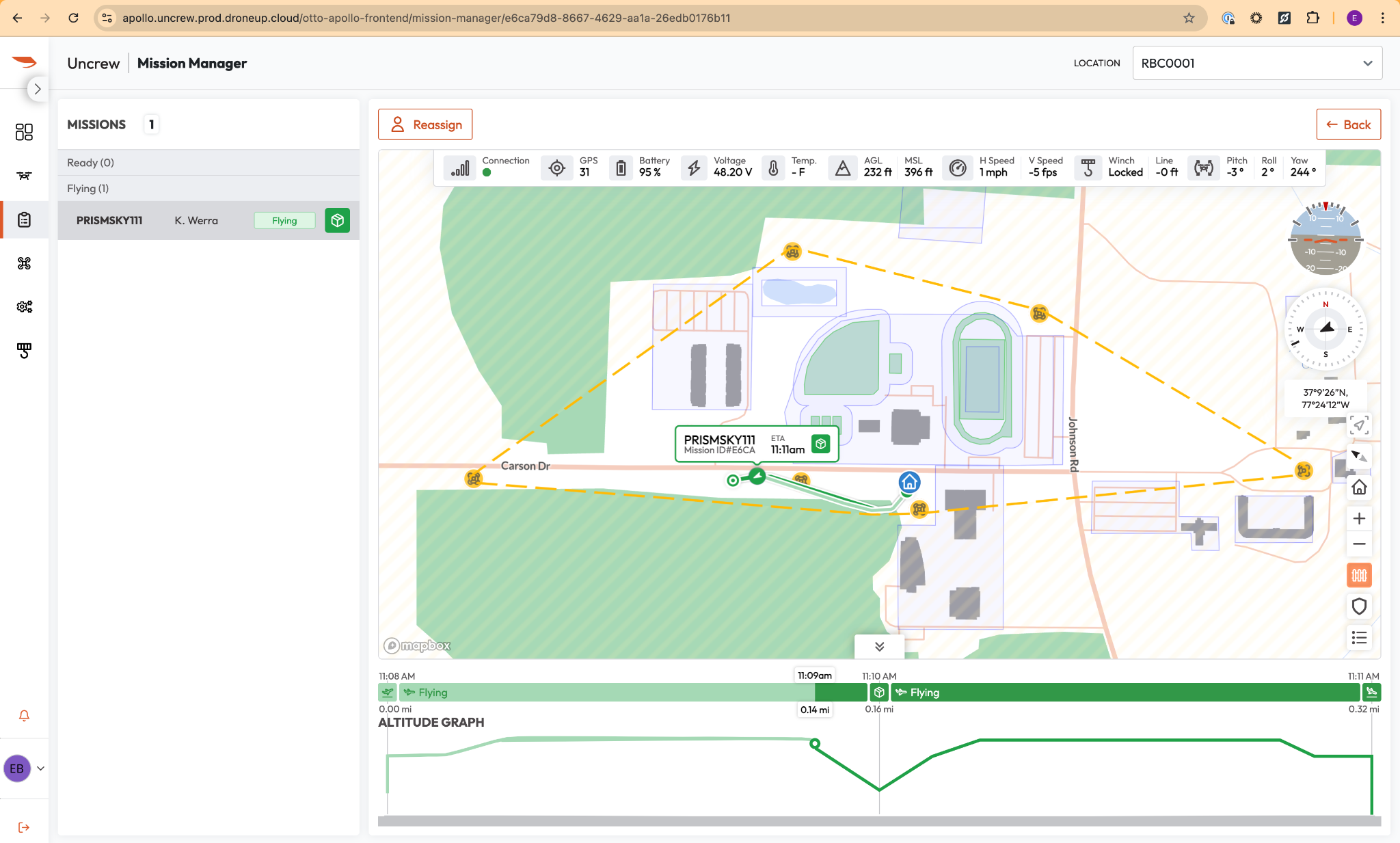
Mission Manager serves as the primary command-and-control interface for supervisory oversight of all Unmanned Aircraft System (UAS) operations within a local area. Accessible to Supervisors, Administrators, Operators, Vehicle Managers, and Visitors with role-appropriate permissions, it provides comprehensive real-time monitoring, verification, and assignment support across the entire operational area.
Once an active mission is received from HubOps or generated via the Mission Planner, it populates within Mission Manager. This interface is critical for maintaining situational awareness and ensuring the safety and compliance of the entire flight network.
Real-Time Monitoring
To meet strict compliance and safety standards, the Mission Manager provides a unified view of all flight operations in an area. Supervisory personnel can monitor multiple aircraft simultaneously, ensuring that every flight in the area is accounted for in real time.
Mission List: Displays all missions across the network, organized into dynamic status categories including:
- UNASSIGNED
- READY
- TIMEOUT
- FLYING
- HOLD
- DELIVERY
- CONTINGENCY
- CANCELLED
- ABORTED
- COMPLETED
Empty categories are automatically hidden, except Assigned and Flying, to reduce visual clutter while preserving operational awareness.
Site-Based Filtering: A location selector in the Mission Manager header filters both the mission list and map to a specific operational area, enabling focused oversight of a single network area, when required.
Flight Readiness: Provides immediate visual confirmation of aircraft state and mission parameters. Missions are color-coded by criticality level:
- Healthy (green)
- Caution (yellow)
- Warning (red)
This enables rapid assessment of the network’s operational condition.
Live Telemetry: Streams critical flight data directly from the aircraft to the Mission Manager interface via persistent gRPC subscriptions. Telemetry streams automatically reconnect after network interruption and gracefully handle gateway inactivity timeouts.
Interactive Map Visualization: A MapBox based operational map displays active missions with mission tags and popups, planned route layers, live drone position and heading overlays, and click access to detailed mission information.
Mission Criticality Alerts: A notification system surfaces new mission arrivals, status transitions, assignment changes, caution and warning events, connectivity degradation, winch events, and contingency actions in real time.
Pre-Flight Verification & Telemetry
Before any mission is assigned or initiated, the RPIC is responsible for conducting a rigorous verification of the aircraft’s telemetry and mission integrity. The Mission Manager presents the following real-time metrics and decision aids:
- Connection Status: Verify the connection status indicator is green.
- Green: Aircraft is online, connected, and in an armable state.
- Yellow/Red: Aircraft is offline or in a non-armable state; troubleshooting is required before proceeding.
- Remote ID (RID): When enabled, confirms whether the aircraft’s FAA Remote Identification broadcast is active or inactive to support regulatory compliance.
- Altitude Profile Graph: The RPIC must verify the accuracy of the altitude graph (AGL/MSL) and speed parameters to ensure they align with the planned mission and environmental constraints. The altitude graph provides:
- Planned flight-path altitude at each waypoint.
- Actual drone altitude in real time during flight.
- Terrain elevation profile along the route.
- Contingency path overlays when contingency procedures are triggered.
- Distance markers with mission objective milestones.
- Interactive hover detail for altitude values at any point in the route.
- Aircraft Health Metrics: Monitor live vitals, including:
- Battery & Voltage: Remaining battery percentage with real-time voltage readings.
- GPS Integrity: Number of satellites acquired for high-precision positioning.
- System Temperature: Internal component temperature displayed for rapid trend awareness.
- Winch & Payload Status: Winch reel state, line deployment length, and delivery system integrity.
- Aircraft Attitude: Live pitch, roll, and yaw values for spatial orientation awareness.
- Horizontal & Vertical Speed: Ground speed and vertical velocity for trajectory verification.
- Mission ETA: Estimated time to each mission objective, recalculated continuously as the aircraft progresses through the route.
- Terrain Integration: Terrain elevation data is used to normalize altitude displays to AGL, improving terrain-clearance awareness across the entire route.
Mission Assignment and Control
Once telemetry is verified and the aircraft is confirmed ready, the Supervisor assigns the mission. Assignment and cancellation actions are restricted to users with the Supervisor role.
- Assignment: Allocate a pending mission to a specific remote pilot, allowing them to initiate the operation. The Supervisor selects an available Remote Pilot from the operator list and confirms the assignment before the mission proceeds.
- Reassignment: Missions in ASSIGNED or IN_PROGRESS status may be reassigned to a different Remote Pilot when operational continuity requires relief or a staffing change.
- Cancellation: If a mission must be cancelled due to changing weather, safety concerns, or equipment issues, the Supervisor utilizes the “Cancel Mission” control and may record a supporting comment. Missions can only be canceled before takeoff while still in SUBMITTED or ASSIGNED status.
| Status | Description |
|---|---|
| UNASSIGNED | Created and awaiting operator assignment |
| READY | Operator assigned and awaiting mission start |
| FLYING | Mission actively executing |
| HOLD | Aircraft is in the air and holding position |
| COMPLETED | Mission finished successfully |
| CANCELED | Mission canceled by a supervisor or assigned pilot |
| ABORTED | Mission terminated abnormally |
| TIMEOUT | UTM approved plan expired before completion |
| DELIVERY | Mission actively delivering package |
| CONTINGENCY | Aircraft has entered a state where objectives cannot be completed |
Table 1: Mission Lifecycle States
Mission Execution Controls (Mission Console)
Mission execution controls are outside of the Mission Manager Page. They are located in the Mission Console Interface.
Once a mission has been assigned and the Remote Pilot goes on shift, the primary execution controls are managed from the Mission Console interface described in the following section. In summary, the RPIC uses that interface to control:
- Flight Controls: Start Mission, Hold Mission, Resume Mission, Click-to-Fly, Return to Home, Safe Altitude, ALZ Landing, Land in Place, and Emergency Flight Terminate.
- Delivery Controls: Start Delivery, Confirm Delivery Ready, Complete Delivery, and Abandon Line.
- Logging: Flag Mission for timestamped post-flight review.
Shift Management
Shift management controls are outside of the Mission Manager Page. They are located in the Mission Console Interface.
The shift system controls operator availability and the flow of mission assignment across the network.
- Start Shift: The RPIC selects an operational location and confirms readiness, including completion of pre-flight checks, before accepting mission responsibility.
- End Shift: The RPIC may either wait for currently assigned missions to conclude before ending the shift or request reassignment of active missions.
Mission Planning
Mission planning controls are outside of the Mission Manager Page. They are located in the Mission Planner Interface.
Mission planning supports the creation of missions before they appear in the Mission Manager for operational review.
- UAV Selection: Choose the aircraft that will execute the mission.
- Site Selection: Select the operational location.
- Objective Types: Configure takeoff, waypoint, loiter, spin, delivery, and landing objectives.
- Visual Route Planning: Build and reorder the route on the map with objective placement and route visualization support.