Canceled Orders Page

The “Canceled Orders” page is additional information for the RPIC and is not used while in flight.
The “Canceled Orders” page is where the RPIC can find all orders canceled at any/all droneport(s) that the RPIC has been granted access to. Access may be controlled by the purchaser of the UAS or can be configured by request to the manufacturer.
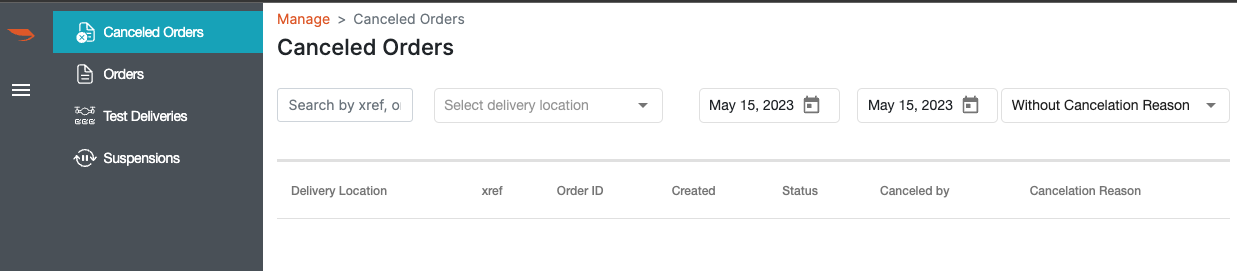
Only orders that have been canceled will display on this page. The option to search by reference number or order number is available, as well as a delivery location drop down list that allows the RPIC to select the desired droneport(s)
There are also features to sort search results by a range of dates as well as filters to include: orders with cancellation reason set; without cancellation reason set; and an option to view all.
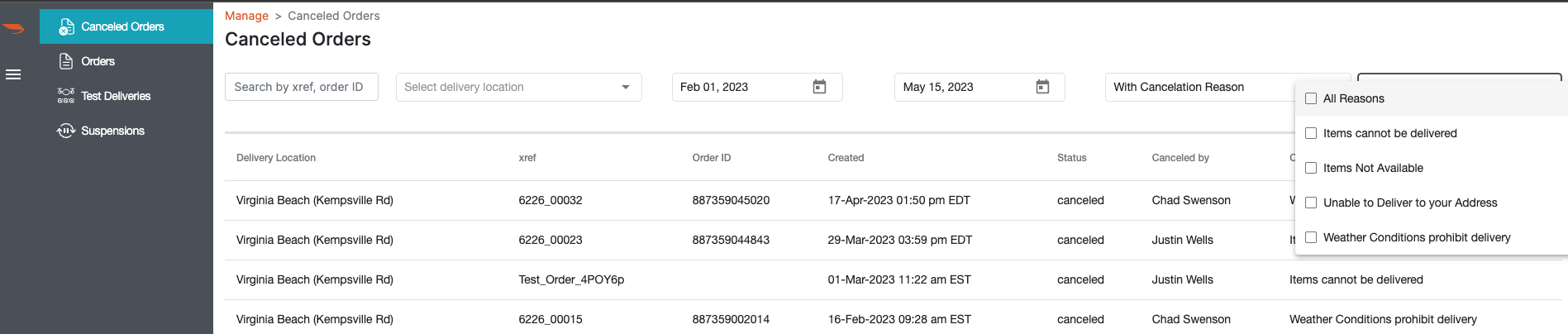
If canceled orders are sorted by “With Cancellation Reason,” an additional filter option is displayed, allowing the RPIC to sort by a specific cancellation reason such as “Items not available”, “Weather conditions”, and more.
When results populate, they display the Hub Location, Order ID#, Date, Status, who it was canceled by, and for what reason it was canceled.
This is the page that the RPIC or designated personnel utilizes after an order has been canceled to assign it a cancellation reason, which will inform the customer (i.e. the person who placed the order) why their order was canceled and then initiates the refund for the customer’s order.
Setting the reason code separately from the actual cancellation allows for the RPIC or designated personnel to make quick decisions without having to handle the deliberation of why the order was canceled. This provides the RPIC or designated personnel the opportunity to define the cancellation reason at a later period, ensuring the customer received the correct messaging without interrupting procedures.