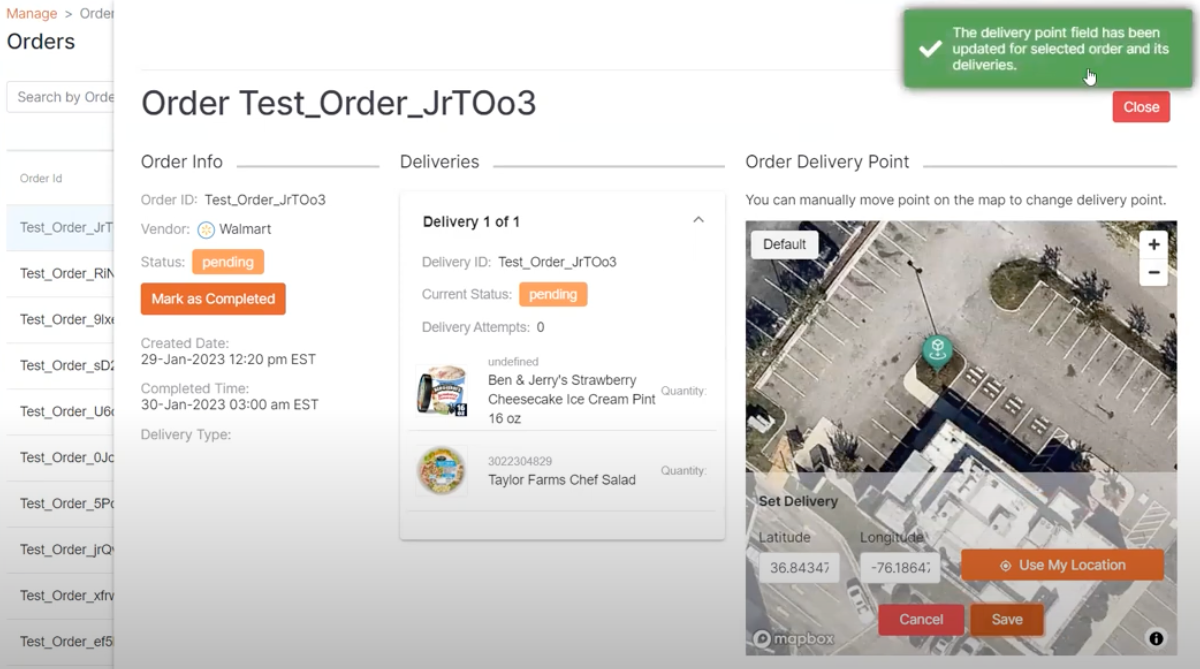
Orders Page

The “Orders” page is additional information for the RPIC and is not used while in flight.
The Orders page allows the RPIC to see all order history relating to a droneport and most importantly, to set the delivery point for pending orders.
The RPIC can adjust the longitude and latitude of the delivery point before takeoff to ensure the Uncrew flight plan is correct.
The RPIC can view orders in any status including; pending, acknowledged, picking, picked, packing, packed, canceled, and completed.

The RPIC can search via the Order ID (xref) number, sort by location, range of dates, and status to find the desired order results.
If “All Statuses” is selected, “Pending**”** orders display at the top of the list.
Once a pending order is selected, the RPIC will see the following fields for the selected order:
Order Info;
Products Contained in Order;
Order Delivery Point Map Information
Once the delivery point is selected, clicking the “Save” button updates the delivery point location associated with the order, and a confirmation message is displayed in green at the top right.