Hub Status Monitoring

The Hub Status Monitoring associated element is a software application which provides a user interface (referred to “Hub Dashboard” henceforth) into near real-time prognostic information regarding a hub and its device connectivity.
The Hub Dashboard is available as a pre-installed application on the hub device being used as the RPIC Control Station. Additional droneport locations can be added either by the manufacturer upon request.
The Hub Status Monitoring application updates the Hub Dashboard at a frequency of once every 15 minutes.
In addition to displaying the last time the information was updated, for all of the following conditions, the dashboard displays a GO / NO GO:
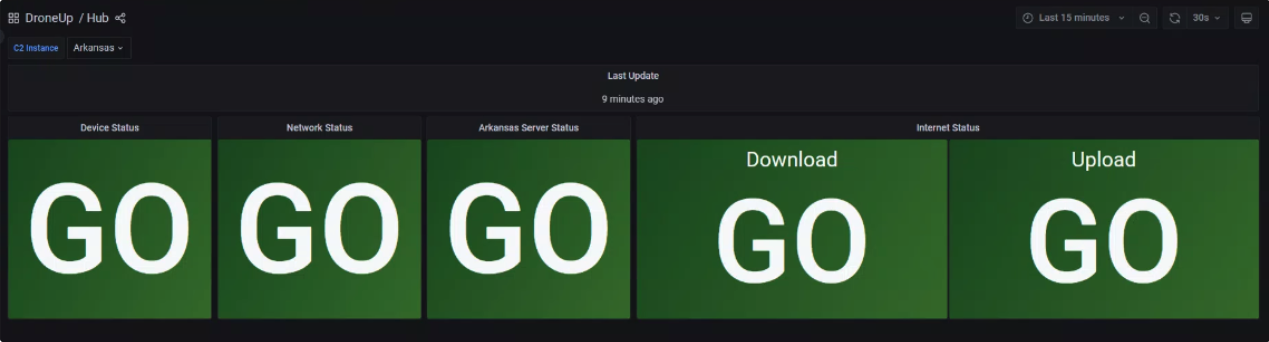
Device Status: Checks the Ground Station CPU core temperatures. The highest temperature is reported. Threshold: GO: 0-79°C, NO GO: 80-200°C
Network Status: Threshold: GO: minimum latency is met or exceeded (0-275ms), NO GO: minimum latency is not met (above 275ms).
Uncrew Server Status: Checks the continuity of signal of the Server in the C2 Instance picker dropdown with http GET. Threshold: GO: continuity status reported, NO GO: continuity status not reported.
Internet Status: Checks the latency to the internet using Google and CloudFlare DNS servers. Threshold: GO: minimum latency is met or exceeded (0-275ms), NO GO: minimum latency is not met (above 275ms).
| Status | Indicator | Action |
|---|---|---|
 | GO — No Issues Detected | Operation may continue. |
 | NO GO — Major Issues Present | Before flight: Do not take off. Follow preflight normal procedures for steps to move forward. During flight: Connection issues present, proceed with flight and prepare for degraded C2 or complete loss of C2. |