Midair Collision Imminent

INDICATIONS
- The RPIC observes through visual line of sight, or through telemetry/remote sensing (such as sensors, cameras, or the Flight Alerter application), that their aircraft is in close proximity to another object or aircraft, and the flight paths are converging with insufficient separation distance.
POSSIBLE CAUSES
Intruding aircraft in area of operation
Loss of situational awareness
Software failure
FAILSAFE BEHAVIOR
There is no Failsafe for this emergency.
PROCEDURE
COLLISION IMMINENT ANNOUNCE
The RPIC is to announce the voice comms “Collision Imminent” once emergency conditions are identified using the indications information above.
INTRUDING AIRCRAFT LOCATION ANNOUNCE
The RPIC or VO is to announce on voice comms the location of the intruding aircraft.
UNCREW: DEFENSIVE CROUCH SELECT
Select the “Defensive Crouch” button that is located in the top left corner of the Uncrew Mission Console on the RPIC Control Station.

Once the “Defensive Crouch” button is selected, the aircraft comes to a stop and begins descending to 80 ft AGL.
Video Feed MONITOR
The RPIC is to use the ASMIRA video feed on the RPIC Control Station to continue monitoring the area directly beneath the aircraft looking for obstacles.
If obstacle is observed in descent path:
Uncrew: Pause SELECT
Select the “Pause” button that is located in the top left corner of the Uncrew Mission Console on the RPIC Control Station.

Once the “Pause” button is selected, the aircraft stops its descent and holds in place until the next command is given.
Maintain current altitude and position, proceed to Uncrew: Resume
Altitude is equal to 80 feet based on LiDAR Rangefinder VERIFY
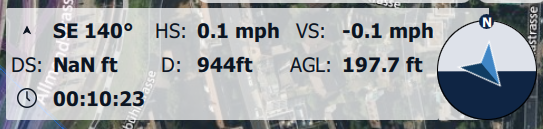
Inspect the current AGL Altitude using the telemetry in the bottom right corner of the Fly View map interface on the RPIC Tablet. The LiDAR Rangefinder (Distance Sensor) altitude is designated by “DS:”.
Uncrew: Resume SELECT
Select the “Resume” button that is located in the top left corner of the Uncrew Mission Console on the RPIC Control Station.

Once the “Resume” button is selected, the aircraft will begin ascending to cruise altitude before continuing with the planned mission.
Alternatively, it is within the RPIC’s authority to select the Return to Home button via Uncrew.