Altimeter Conversion

Originally
ADR--0118-altimeter-conversion (v17) · Source on Confluence ↗Conversion Algorithm for the Altimeter Service
20eecadb-7d39-4aa6-b84a-388b030a05c38f09259e-ee18-4c25-a4d1-380452912582DECIDEDDiscussed on ARB - approved.
- Discussed on ARB 11 Sep 2025- approved.
Context
[Altimeter Service Concept](confluence-title://PDART/Altimeter Concept Introduction)
Jama Ticket
We need to centralize our altitude conversion to ensure that it is consistent across the company’s systems. This will enable us to fix bugs in one place and ensure that our conversions are accurate across all of our systems.
To that end, we will develop a library to perform the conversions that can be used in cloud services and onboard.
For our purposes, horizontal conversion is not considered. This is because the horizontal conversion between NAD83 and WGS84 is handled during the data file generation process so it’s not in scope for the altimeter service.
Future Milestones
This ADR covers the conversion algorithms and speculates about cache techniques, but it does not cover work planned for future milestones. Those milestones will include the following capabilities and will be documented in ADRs as appropriate:
- A loading and caching system that is flexible enough to download and cache (on various mediums) geospatial data of various tiling schemes.
- An API to translate lat/lng to elevation over whatever references are relevant to the request.
- An API to perform the elevation lookup for an array of coordinates.
- A way to apply these tools to other data like population density or airspace.
Source Data Layout
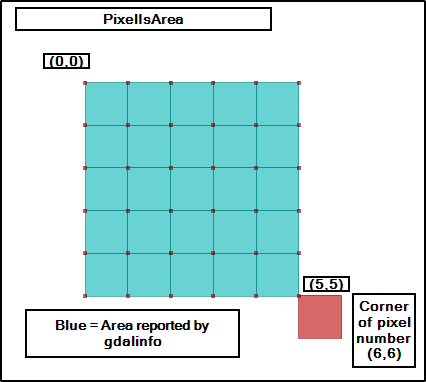
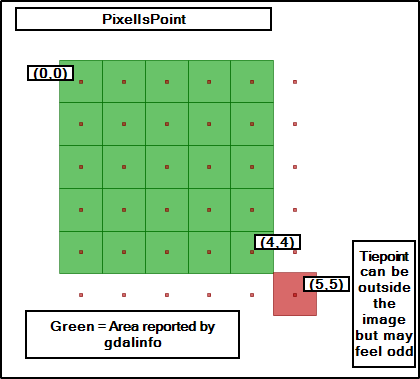
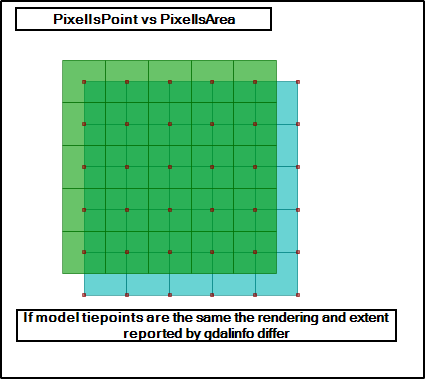
The source data used by the altimeter service will be stored in the geotiff format. Our pipelines will compress the geotiff data into a proprietary format for altimeter use. Geotiffs interpret their pixels as either an altitude for an area (PixelIsArea) or the altitude as a single point (PixelIsPoint). Our system will support both cases.
AREA_OR_POINT: May be either “Area” (the default) or “Point”.
Indicates whether a pixel value should be assumed to represent a sampling over the region of the pixel or a point sample at the center of the pixel. This is not intended to influence interpretation of georeferencing which remains area oriented.
Decision
Overview
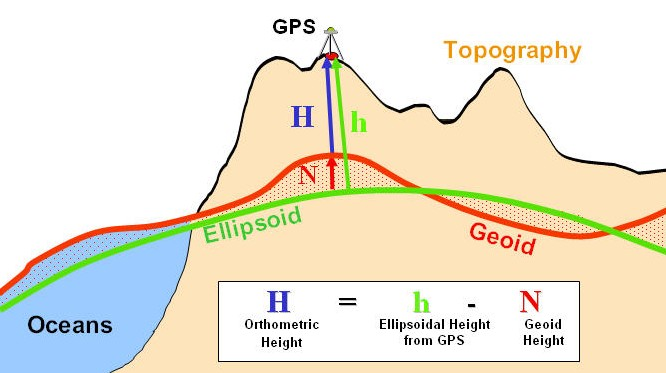
Initially, we will convert NAVD88 altitudes to WGS84 for use internal to our systems. As the need arises, we will add functionality to convert other geoids. For the NAVD88 to WGS84 conversion, we would perform the following operations:
Receive a conversion request that includes an altitude above the NAVD88 geoid, latitude, and longitude.
Find the index in the NAVD88 Geoid grid that contains the target lat/lon
- For data that is in Pixel as Area format, return the value at the index.
- For data that is in Pixel as Point format, find the surrounding points in the grid and perform bilinear interpolation to calculate the altitude.
Return h = H + N, where h is the ellipsoidal height, N is the height of the geoid above the ellipsoid at the given point, and H is altitude.
To convert an AGL altitude, we would first convert the AGL altitude to a NAVD88 altitude. In this initial use-case, the terrain data we have is referenced to NAVD88 so we would perform the following steps to convert AGL to NAVD88:
- Receive a conversion request with an AGL altitude and a lat/lon.
- Find the index in the terrain grid that contains the target lat/lon
- Return h = T + A, where T is the interpolated height of the terrain tile and A is the AGL altitude passed in with the request.
Data File Format
See the detailed file description details. Much of this information is repeated here for convenience.
The DGD file format is laid out as a header followed by data. The header has these fields:
Header Layout (37 bytes)
All fields are encoded in big-endian byte order.
| Offset | Name | Type | Size (bytes) | Description |
|---|---|---|---|---|
| 0 | Version | uint8 | 1 | File format version (0–255) |
| 1 | Top | float64 | 8 | Latitude [deg] of Top Left corner of the matrix |
| 9 | Left | float64 | 8 | Longitude [deg] of Top Left corner of the matrix |
| 17 | Bottom | float64 | 8 | Latitude [deg] of Bottom Right corner of the matrix |
| 25 | Right | float64 | 8 | Longitude [deg] of Bottom Right corner of the matrix |
| 33 | Width | uint16 | 2 | Width of the data array |
| 35 | Height | uint16 | 2 | Height of the data array |
Geoid Data Section
- The data section begins at byte 37, immediately following the header.
- Values are stored in row-major order, i.e., left-to-right, top-to-bottom.
- Each value is a signed 16-bit integer (
int16), encoded in big-endian byte order. - Each value represents the offset from WGS84 Ellipsoid measured in meters
- The latitudes and longitudes in the file are referenced to the WGS84 ellipsoid.
Using the Data File
- Load the data file
- Decode header
- Allocate data array using height and width from header
- Decode raw data into array
- Lookup elements by converting lat/lon into array indexes using the top, left, bottom, and right fields from the header.
Grid Layout
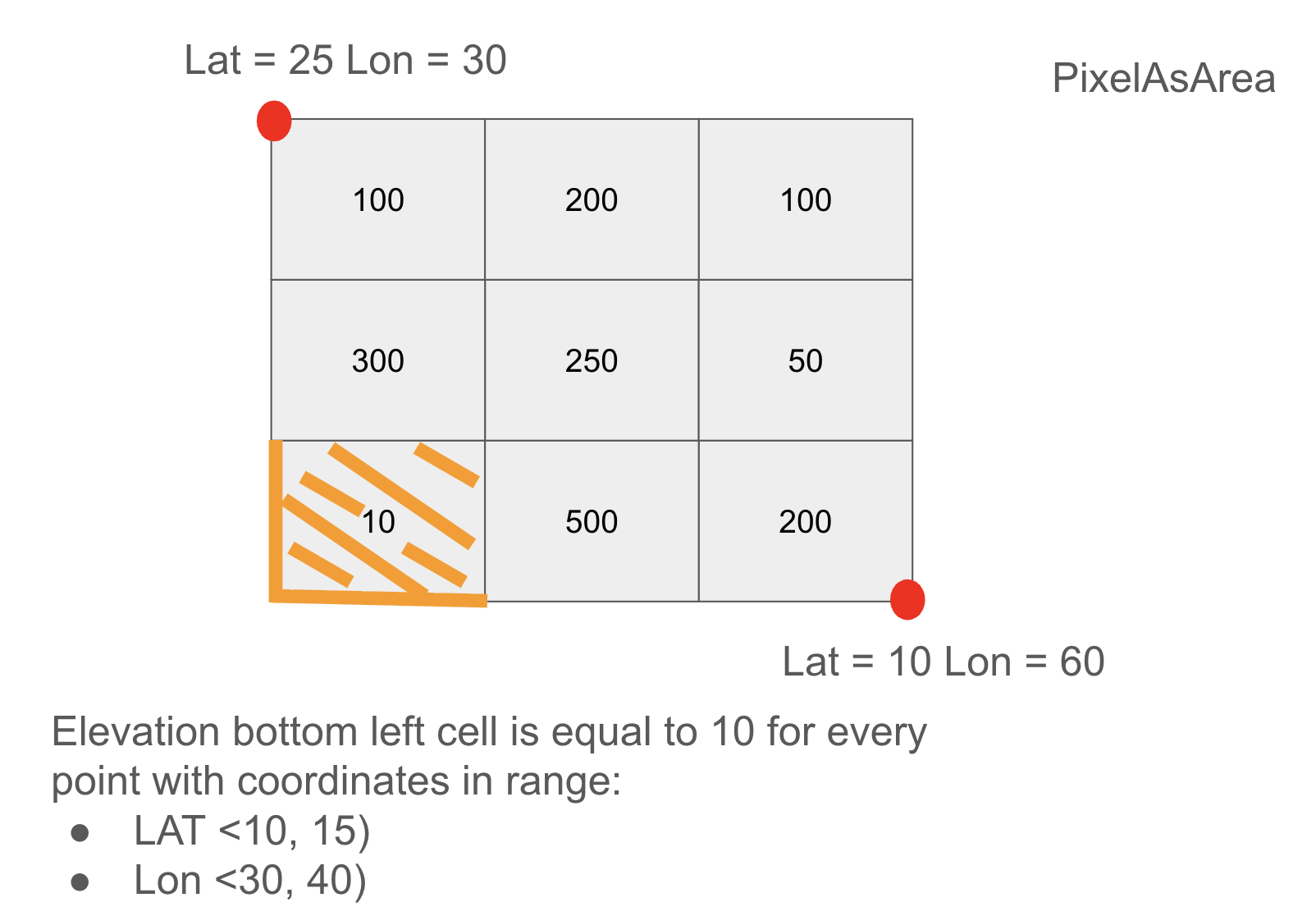
The DGD file format is base on the GeoTiff standard. Geotiff supports two standards for interpreting the value at a pixel. Pixel as area means that the data points are interpreted as representing the altitude for the entire area surrounding the data point. Pixel as point is more straightforward: the data represents the altitude at that specific point.
The data points in the DGD file represent the altitude of an area or point (controlled by the AreaOrPoint flag) defined by the grid spacing that is defined in the DGD header.
Caching
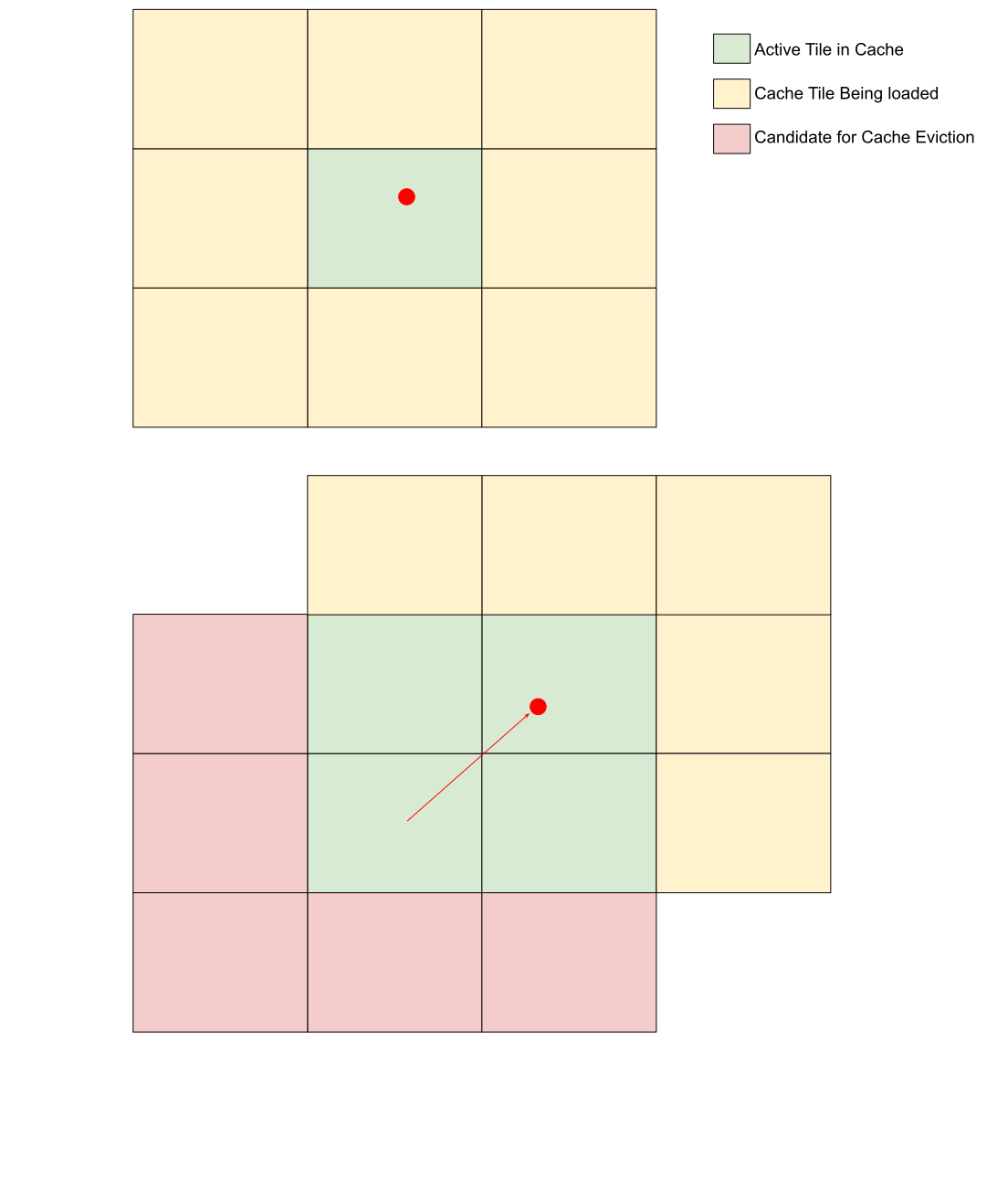
These calculations require access to height data, either the Geoid or terrain tile. This data can be very large, but we want the altitude conversions to be as real-time as possible. As we develop the system we’ll need to explore various caching strategies to find which one fits our use cases the best.
One possible algorithm is to cache the the data from the altitude request as well as surrounding tiles. This assumes that future requests will be in the area surrounding the original request. This algorithm could be tuned by adjusting the tile area (for example, 1 square kilometer) vs resolution (if the source data is spaced at 10 meter intervals we could interpolate a sparser grid at 100 meter intervals).
Consequences
After this change we will have consistent altitude conversions across all of our systems as well as onboard drones that are running our firmware.
Alternatives Considered
Using the proj library to perform conversions - this option was rejected because:
- It requires a large amount of storage for its data files
- It was not written for safety-critical applications
- It would be difficult to change or fix bugs due to the size and history of the codebase.