Mission Plan Handoff Architecture For MAVLink Shim

Originally
ADR--0033-Mission Plan Handoff Architecture for Mavlink Shim (v5) · Source on Confluence ↗Mission Plan Handoff Architecture for Mavlink Shim
Context
The Uncrew onboard software component needs to communicate mission plan changes to the Avatar and Frontend when route modifications occur (e.g., Return to Launch or CLZ redirects). Currently, the Mission Service formats missions with specific objectives, but the shim uses a different approach when generating new paths. We need to standardize how these updates are communicated to maintain consistency in the user experience.
Decision Drivers
- Need for consistent mission plan representation across different sources (Mission Service vs. shim)
- Requirement to display updated traversal paths and associated SOPs clearly
- UTM compliance through flight intent updates
- Frontend and Mission Service state synchronization
Decision
Mission Plan Update Format
The Uncrew onboard software will package mission updates in the following structure:
message SubmitMissionPlanUpdate {
    types.v1.UavID uav_id = 1;
    MissionPlan plan = 2;
    types.v1.MissionID mission_id = 3;
    google.protobuf.Timestamp created_at = 4; // Onboard time when mission create, needed to prevent potential race condition of mission updates in mission service and frontend.
    bool skipApproval = 5; // UAV will fly this path even when UTM does not approve it.
    string plan_id = 6; // Unique plan id generated onboard
}

message MissionPlan {
  repeated MissionItem items = 1;
}

message MissionItem {
  MissionItemDetail detail = 1;
  types.v1.Position3DWithTerrain position_with_terrain = 2;

}
Communication Flow
- Initial Path Change Trigger
- Shim receives command (RTL/CLZ)
- Pathfinder generates new route
- Shim prepares MissionPlanUpdate
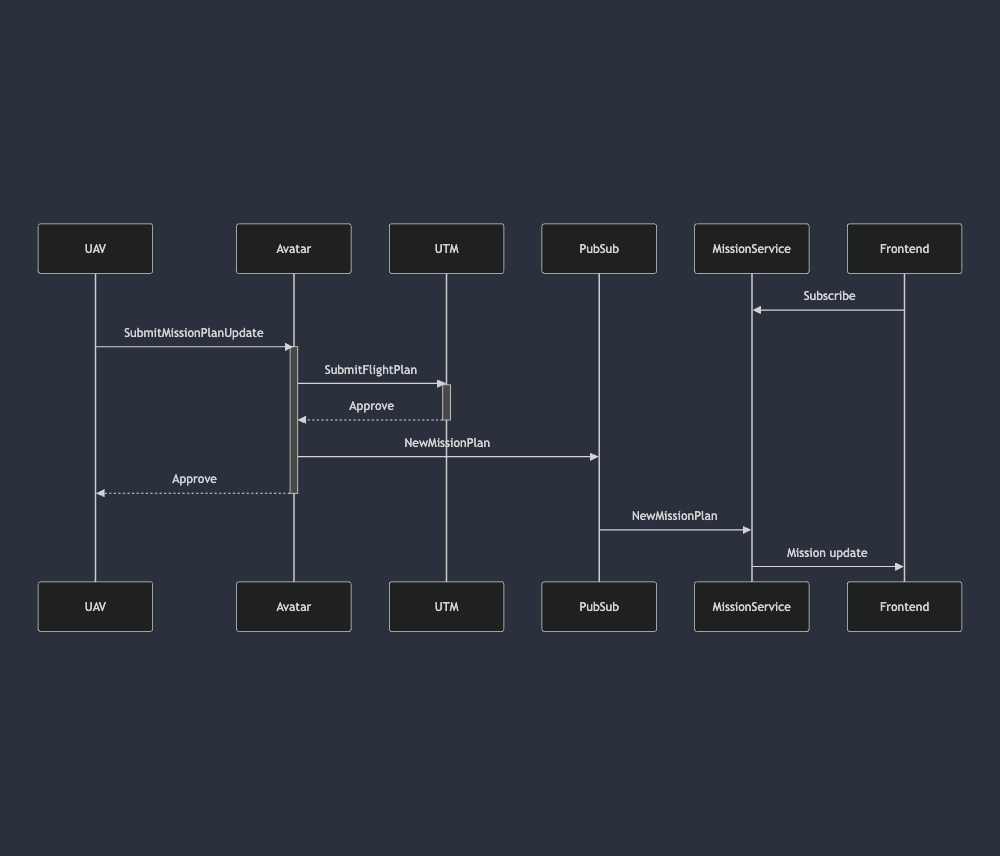
- Happy path
Mermaid code
mermaid
sequenceDiagram
participant UAV
participant Avatar
participant UTM
participant PubSub
participant MissionService
participant Frontend
Frontend-»MissionService: Subscribe
UAV-»Avatar: SubmitMissionPlanUpdate
activate Avatar
Avatar-»UTM: SubmitFlightPlan
activate UTM
UTM–»Avatar: Approve
deactivate UTM
Avatar-»PubSub: NewMissionPlan
Avatar–»UAV: Approve
deactivate Avatar
PubSub-»MissionService: NewMissionPlan
MissionService-»Frontend: Mission update
- JeffRTL Scenario
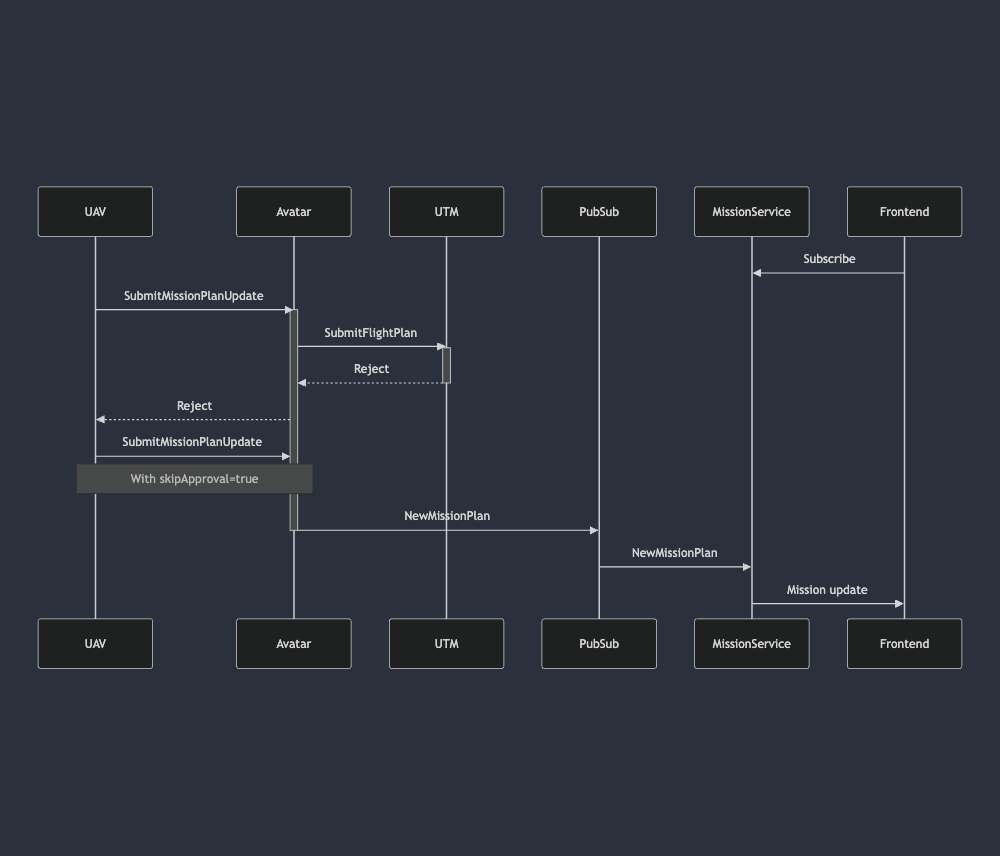
If Pathfinder fails or UTM rejected new path then we execute JeffRTL and send SubmitMissionPlanUpdate message with skipApproval=true to notify the mission service and frontend about new plan.
Error Handling
Rejection Scenarios
- UTM Rejection
- Attempts alternate path if available
- Falls back to JeffRTL if no alternative plans or they rejected too
Details
sequenceDiagram
participant UAV
participant Avatar
participant UTM
participant PubSub
participant MissionService
participant Frontend
Frontend-»MissionService: Subscribe
UAV-»Avatar: SubmitMissionPlanUpdate
activate Avatar
Avatar-»UTM: SubmitFlightPlan
activate UTM
UTM–»Avatar: Reject
deactivate UTM
Avatar–»UAV: Reject
UAV-»Avatar: SubmitMissionPlanUpdate
Note over UAV,Avatar: With skipApproval=true
Avatar-»PubSub: NewMissionPlan
deactivate Avatar
PubSub-»MissionService: NewMissionPlan
MissionService-»Frontend: Mission update
- Avatar Rejection\Connection lost
- Shim implements retry logic (max 3 attempts)
- Falls back to JeffRTL if all attempts fail
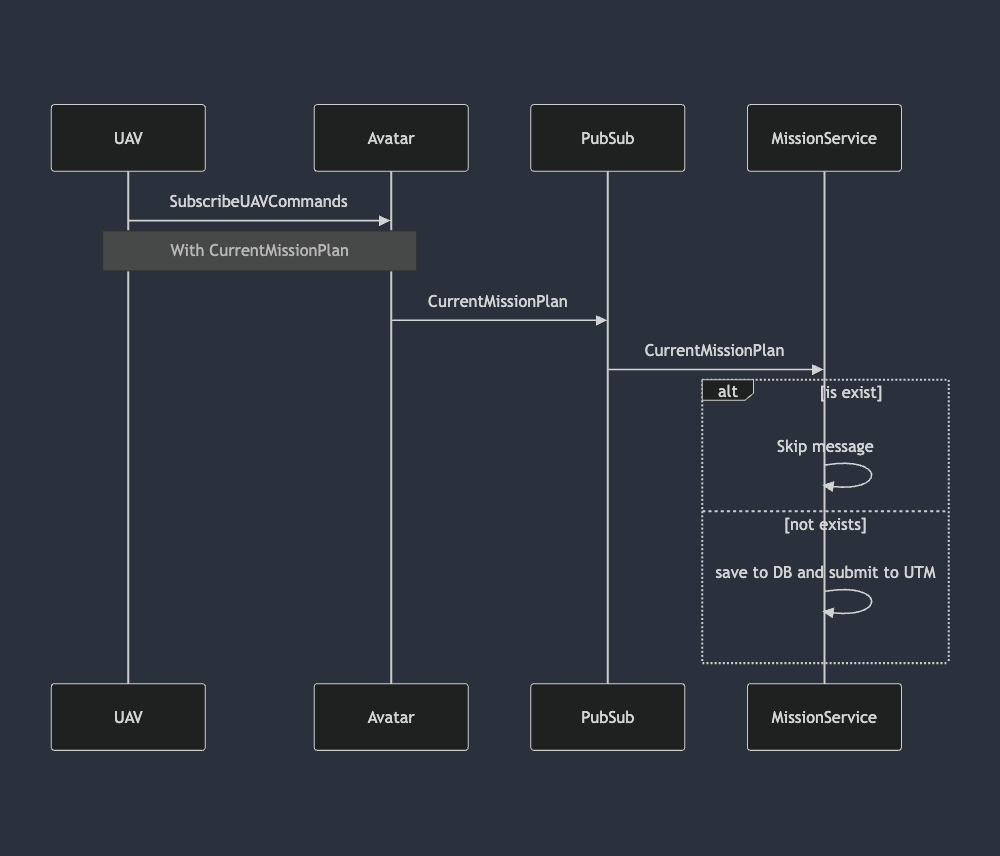
- The Pilot and Mission Service always need to know the current mission plan, even in cases when we establish a connection after a long connection loss. To support this, the UAV should send the current mission plan on each connection to the SubscribeUAVCommands stream.
mermaid code
mermaid
sequenceDiagram
participant UAV
participant Avatar
participant PubSub
UAV-»Avatar: SubscribeUAVCommands
Note over UAV,Avatar: With CurrentMissionPlan
Avatar-»PubSub: CurrentMissionPlan
PubSub-»MissionService: CurrentMissionPlan
alt is exist
MissionService-»MissionService: Skip message
else not exists
MissionService-»MissionService: save to DB and submit to UTM
end
Consequences
Positive
- Clear error handling paths
- Maintained UTM synchronization
- Frontend state consistency
- Connection and fault tolerance
Negative
- Potential race conditions in state updates
References
UNCREW-3319: Interface on new mission plans with Avatar/Onboard