Ecommerce Identity Provider

Originally
ADR-0016-ECOMMERCE-IDENTITY-PROVIDER (v7) · Source on Confluence ↗Ecommerce Identity Provider
Context
In our current e-commerce project, we face challenges with our mobile application identity management, particularly regarding scalability, security, and implementation difficulties. The existing solution (FrontEgg) doesn’t meet the needs of iOS and Android clients:
- Customization Limitations of Tenant-Specific Login Pages
FrontEgg offers each tenant a unique login page, which is a significant advantage for branding and user experience. This feature allows for extensive customization, including altering the overall design and incorporating specific logos or themes that align with the tenant’s branding strategy.
Despite these customization options, a major drawback is the inability to enable the SignUp feature for these individualized tenant login pages.
This limitation does not allow the use of a custom UI for a separately created Mobile Commerce tenant because users cannot register a new record in this tenant. - Strange behavior when using the General/Main Login Box
The general or main login box of FrontEgg, while offering a SignUp function, comes with its own set of constraints. This necessitates the adoption of a universal design for the login page, which considerably limits the ability to offer tenant-specific customization, such as tailored branding elements or unique user interface designs. Specific Problems:
- The inability to present tenant-specific features like “SignIn by Apple” for iOS devices restricts the potential for creating a fully integrated user experience.
- When users register through the main login page, FrontEgg automatically creates a new tenant with the registering user’s name. This automatic creation of tenants may lead to unnecessary clutter and management complexities.
- By default, users registered via this method are assigned Admin permissions, which could pose security risks if not properly managed and reconfigured.
- Limited Functionality of FrontEgg Customization Tool
While FrontEgg’s customization tool offers some level of design flexibility, it falls short in allowing for more nuanced modifications. For instance, certain default fields on the registration page, such as the Company text field, cannot be removed. Additionally, the Full Name field cannot be split into First Name and Last Name, which is a common requirement for many applications.
This led to development delays and significant investment costs for possible solutions.
Requirements
- Low latency
- Easily Deployable
- Scalable
- OIDC Compliant
Decision
After researching multiple alternatives of identity solutions, it was decided to use Google Identity Platform to authorize users.
What are the main advantages of GIP that influenced our choice of this particular platform?
- Anonymous login.
The specifics of ecommerce applications imply that the user has access to a preview of goods and/or services without the need for mandatory authorization. But at the same time, requests from the client to the server must be protected by an authorization token, M2M token, certificates and/or other security methods. GIP allows to create and use temporary anonymous accounts to authenticate users. These temporary anonymous accounts can be used to allow users who haven’t yet signed up to your app to work with data protected by security rules. If an anonymous user decides to sign up to your app, you can link their sign-in credentials to the anonymous account so that they can continue to work with their protected data in future sessions. - Google Cloud Platform (GCP) affiliation.
As our company is already utilizing GCP, leveraging GIP as our identity management solution offers a streamlined, cohesive approach. This integration is further facilitated by the use of Terraform, a widely used infrastructure-as-code tool that supports GCP services. Utilizing Terraform will enable efficient, automated deployment and management of GIP within our GCP environment, ensuring a robust and scalable identity solution that aligns perfectly with our existing cloud infrastructure. - Cost.
It’s recognized as one of the most cost-effective solutions in the market, allowing us to deploy a high-quality identity management system without a hefty price tag. This affordability aligns well with our goal of maintaining budget efficiency in our e-commerce project.
Alternatives considered
| Feature | Google Identity Platform | Firebase Authentication | Auth0 |
|---|---|---|---|
| Service Cost | 0 - 49 Monthly Active Users (MAU) for free | < 50k MAU for free | Essential Plan: $35 |
| 50+ for $0.015 per MAU | 50k MAU: 0.015 pet MAU | rofessional Plan: $240 | |
| Approximately cost for 200 MAU | $3 + 0.01 per SMS | $3 + 0.01 per SMS | $35 + $0.0079 per SMS |
| Designer Engagement | STANDARD | STANDARD | LOW |
| Engineering Engagement | STANDARD | STANDARD | STANDARD |
| Basic Supported providers | Password Authentication | Password Authentication | Password Authentication |
| Email Link Authentication | Email Link/Code Authentication | Email Link/Code Authentication | |
| Social Networks | Social Networks | Social Networks | |
| Phone Number | Phone Number | Phone Number | |
| Anonymous Authentication | And lot of other ways | And lot of other ways | |
| Multi-factor authentication | YES | NO | YES |
| Sign in with OIDC | YES | NO | YES |
| Sign in with SAML | YES | NO | YES |
| IAP integration | YES | NO | YES |
| Pros | Ease of Back-End Integration: The MC already have a GCP project with Firebase enabled. Integration should be very easy | High Customizability: Auth0 allows extensive customization to align with your brand and specific authentication workflows. | |
| Anonymous Authentication: This can be used to implement guest checkout flow. | Support for Multiple Identity Providers: It supports a wide range of identity providers, not just Google, including social media, enterprise, and custom databases. | ||
| Advanced Features: Offers advanced features like Single Sign-On (SSO), Multi-factor Authentication (MFA), and user management tools. | |||
| Strong Security: Emphasizes strong security practices and compliance with various standards like GDPR and HIPAA. | |||
| Cons | Limited Customization: Google Authentication offers limited options for customization and branding. | NO Anonymous Sessions: Need a solution for implement Guest sessions. | |
| Expensive |
Consequences
Elastic Path does not provide its own Front-End solutions for user authorization, so this solution cannot entail negative consequences.
Implementation Notes/Details
Flow Diagram
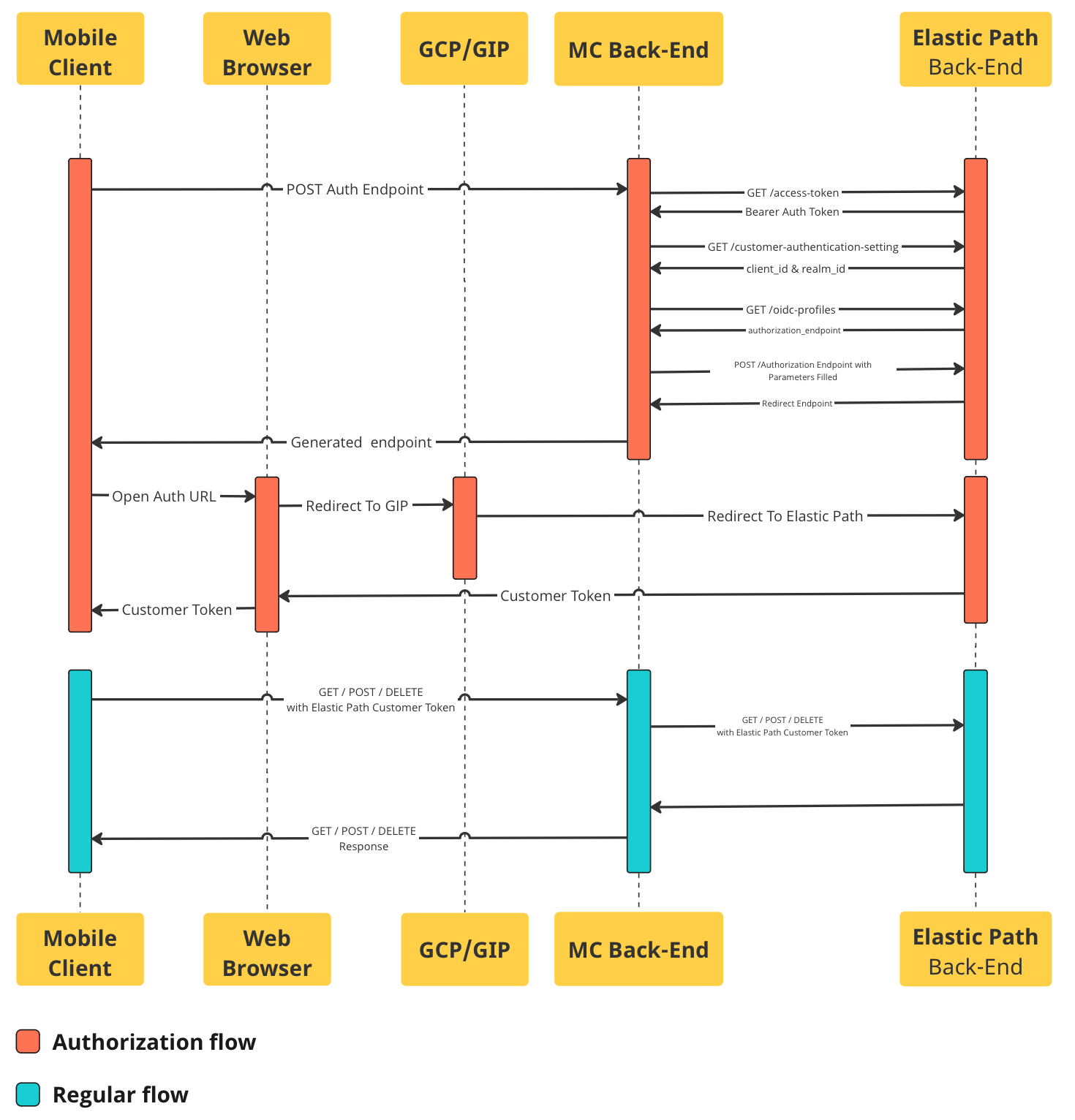
Explanation of Diagram
Mobile Commerce Client Apps will call the Moblie Commerce backend to get the login endpoint.
Mobile Commerce backend will call Elastic Path to get the redirect endpoint.
- Mobile Commerce backend calls Elastic Path’s
POST /access-tokenendpoint to get the requisite “Bearer” token. Elastic Path’s /access-token endpoint documentation. - Mobile Commerce backend calls Elastic Path’s
GET /customer-authentication-settingsendpoint using the “Bearer” from step 2.1 to get authentication related data, such as the “client_id” and “realm_id”. Elastic Path’s /customer-authentication-settings endpoint documentation. - Mobile Commerce backend calls Elastic Path’s
GET /oidc-profilesusing data from steps 2.1 & 2.2 to get the “authorization-endpoint” link Elastic Path’s /oidc-profiles endpoint documentation. - Mobile Commerce backend prepares the endpoint by generating a Proof Key for Code Exchange & adding it as well as various other parameters to the endpoint. Elastic Path’s authorization endpoint documentation.
- Mobile Commerce backend sends the prepared endpoint (from step 2.4 above) request to Elastic Path, prompting it to redirect back to our OIDC provider GIP (Google Identity Platform). This redirect is not followed and is immediately returned back to the Mobile Commerce Client Apps. Elastic Path’s login with OIDC provider documentation.
- Mobile Commerce backend calls Elastic Path’s
Mobile Commerce Client Apps receive the generated endpoint & opens the auth URL in a web browser inside the app using OpenID Mobile SDK (iOS, Android ).
- Web browser following the redirect & will in turn open GIP.
- User is shown a UI prompting them to login via GIP.
- Upon successful sign-on, GIP will redirect the web client back to Elastic Path to authorize the user.
- Elastic Path will validate the data & return to the web client a “customer_token”. Elastic Path’s authenticate & return “customer_token” documentation.
- This “customer_token” is then copied from the web browser back onto the user’s mobile app
While user is signed-in, “customer_token” field will then be used from this point forward to authenticate that they are eligible to have access to whatever data is requested. Elastic Path’s list of endpoints that Support “customer_token”.