Apollo Mission Status

Originally
ADR-0102-Apollo-Mission-Status (v3) · Source on Confluence ↗ADR: Mission and UAV State Management with Criticality
Context
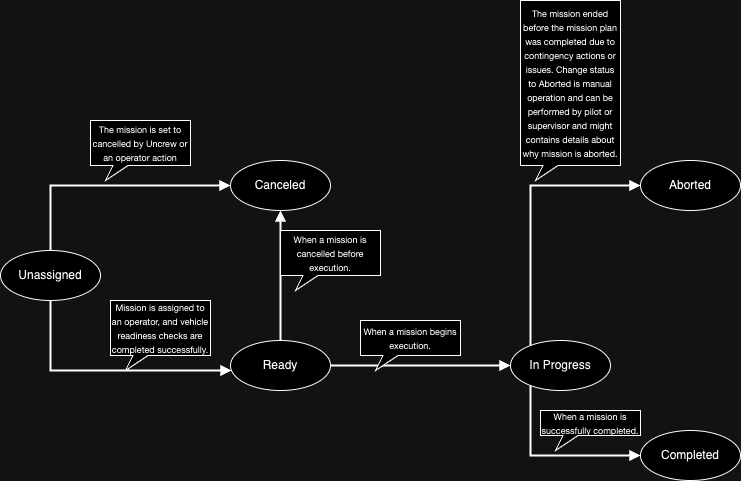
In our system, we have missions for UAVs. Each mission can have the following statuses:
- Unassigned: The mission has been created through a request to Uncrew but has not been assigned to an operator.
- Ready: The mission is assigned to an operator, and vehicle readiness checks have been successful.
- Cancelled: The mission was terminated before starting the mission plan.
- In Progress: The mission is currently being executed by a UAV.
- Aborted: The mission ended before the mission plan was completed due to contingency actions or issues. Change status to Aborted is manual operation and can be performed by pilot or supervisor and might contains details about why mission is aborted.
- Completed: The mission ended and last mission objective is completed
When a mission is in the In Progress status, the UAV can have the following states(superset of PX4 flightmodes):
- Flying: The default status when the UAV is executing the mission plan.
- Hold: The UAV has suspended the execution of the mission plan.
- Delivery: The UAV is performing a drop-off objective.
- Contingency: The UAV is performing a contingency action outside the mission plan.
This document describe rules and list of states that should supported by our system. And describes where is the source of truth for the state and status and how is it communicated to the stakeholders.
Decision
We will implement a state machine pattern to manage the transitions between mission statuses and UAV states. The state machine will enforce valid transitions and ensure data integrity. Mission statuses controlled by mission service and UAV states controls by UAV on board software. These UAV states are considered “flight modes” and can change at any time during the execution of a mission.
Mission Status Transitions
The following transitions are allowed for mission statuses:
UAV State Transitions
During the In Progress mission status, the following transitions are allowed for UAV states:
- Flying → Hold: When the UAV needs to suspend execution of the mission plan.
- Hold → Flying: When the UAV resumes the mission plan execution.
- Flying → Delivery: When the UAV enters the delivery phase.
- Delivery → Flying: When the UAV resumes flight after delivery.
- Flying → Contingency: When the UAV encounters an unexpected situation.
Criticality
Each mission and UAV state will have an associated criticality level, which will be part of the mission execution telemetry. The criticality levels are:
- Informational: No issues, mission proceeding as planned.
- Caution: Non-critical issues or anomalies detected, but mission can continue with caution.
- Warning: Potentially critical issues or conditions, mission may need to be aborted or contingency actions taken.
- Passive: No active issues, but mission is in a passive state (e.g., Cancelled, Aborted).
The criticality levels will be determined based on various factors, such as sensor data, mission parameters, and environmental conditions. The criticality level will be updated dynamically as the mission progresses and will be reflected in the alerts with severity from UAV onboard software.
The criticality levels for each mission status and UAV state are as follows:
Unassigned: Informational, Warning
Ready: Informational, Warning
Cancelled: Passive
In Progress:
- Flying: Informational, Warning, Caution
- Hold: Informational, Warning
- Delivery: Informational, Warning
- Contingency: Warning, Caution
Aborted: Passive
The criticality level will be also used to trigger appropriate actions such as displaying warnings or prompting the operator to take contingency measures.
Additional Details
- The Unassigned status appears in the Mission Manager, and the assign button will be available for the Supervisor to press. Once the assignment is made, the vehicle will begin vehicle readiness and will reach the Ready status when vehicle readiness has been completed.
- The Start button will be presented in the Ready status to start the mission.
- The Cancelled status is specific to ending a mission before it has started. This is a passive informational notification that does not require any action from the operator.
- The Flying status is green (Informational), which means everything is healthy and nothing particular needs to be monitored or acted upon.
- The Hold status can be activated at any time once the mission has started. The Hold button will never be disabled. Hold is also the status for Safe Altitude, both Hold and Safe Altitude are the same actions performed at different altitudes and should be treated the same on the frontend. The Resume button, however, will only be enabled if currently in the Hold status and is in healthy criticality.
- The criticality of the hold is entirely dependent on what criticality was in progress before it since we are opting to never disable the hold button. If we are in a warning state before the hold is pressed, the red criticality remains during the hold.
- The Delivery status is informational because it requires special attention from the Operator but is neutral. This status is activated throughout the duration of the “Drop Off” Objective and requires a start and completion confirmation from the Operator.
- The Contingency status is either caution or warning criticality, depending on the situation, but this is resulting from either the Operator pressing “Return to Home” or “Land In Place” which effectively abandons the original mission plan.
- The Aborted status is the status after a mission has ended, which abandoned the original mission plan. This is specific to contingency scenarios after the vehicle has landed. This is a passive informational notification that does not require any action from the operator.
Consequences
- Implementing a state machine pattern ensures data integrity and prevents invalid state transitions.
- The separation of mission statuses and UAV states (flight modes) allows for better modularity and maintainability.
- The state machine logic can be centralized, making it easier to reason about and modify state transitions if needed.
- Adding new mission statuses or UAV states in the future will require updating the state machine logic.
- Maintaining and updating the criticality levels based on various factors may require additional logic and complexity in the system.