Onboard ROS 2 Interfaces

Originally
ADR-0107-OnBoard-ROS-2-Interfaces (v3) · Source on Confluence ↗OnBoard ROS 2 Interfaces
Context
This ADR proposes the 2nd iteration and additional level of detail for the Uncrew onboard “right-sized”-service architecture to break apart the Mavlink Shim.
This ADR will also propose a path forward for integrating these services into the existing architecture.
Decision
We have decided to use ROS 2 and implement onboard services as nodes in the ROS 2 Graph.
To do so, we must define the necessary ROS 2 interfaces.
Specifically:
- The ROS 2 Nodes (i.e. microservices) necessary, and their responsibilities
- The ROS 2 Topics (pubsub topics)
- The ROS 2 Services (remote procedure calls) available to nodes
- The ROS 2 Actions (long-running remote procedure calls) available to nodes
- The ROS 2 Messages (data which is used to define Topics, Services, and Actions)
These will be listed in this document for convenience, but the actual definitions can be found in the common-cpp-ros2-pkg repo.
ROS 2 Nodes
Nodes represent a unit of computation in the ROS graph.
Here we will define each node, its responsibilities, and the interfaces it uses.
Inventory Client Node
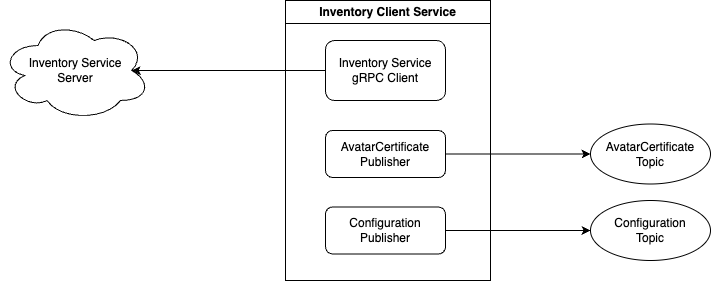
Connects via
gRPCto theInventory Servicein the cloud;Calls
RegisterNewUavto obtain UAV’s personal mTLS certificate needed to connect to the UAV’s Avatar and writes them to disk;Periodically calls
CheckInin order to:- Verify the cached mTLS certificate hasn’t been revoked and if found revoked, stops calling
CheckInand goes to back to (2); - Obtain new/rotated personal mTLS certificates
- Verify the cached mTLS certificate hasn’t been revoked and if found revoked, stops calling
Publishes certificates to
AvatarCertificate TopicPublishes configuration to the
Configuration Topic
Avatar Client Node
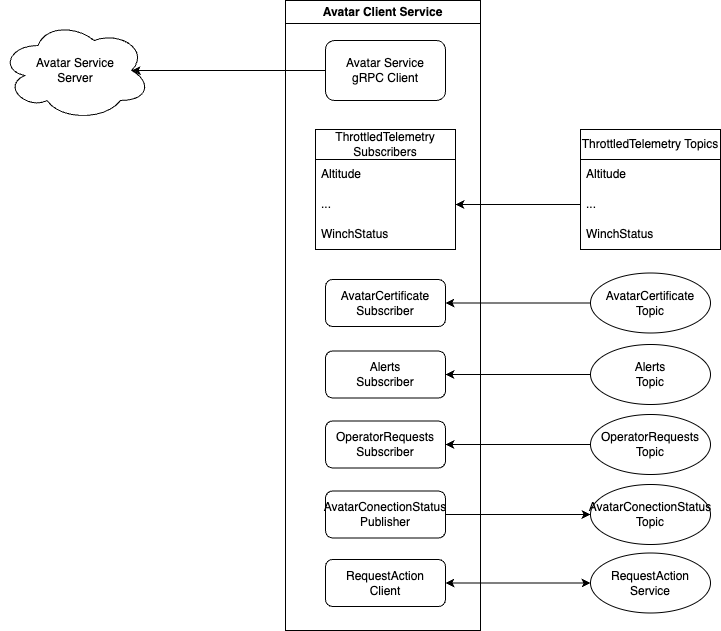
- Subscribes to
AvatarCertificate Topic - Connects via
gRPCto theAvatar Servicein the cloud - Subscribes to
ThrottledTelemetry/* Topicsand forwards telemetry messages toAvatar Service - Subscribes to
Alerts Topicand forwards Alerts toAvatar Service - Subscribes to
Operator Requests Topicand forwards messages toAvatar Service - Forwards C2
Actionrequests fromAvatar ServicetoUncrew Flight Controller
Monitoring Service Node
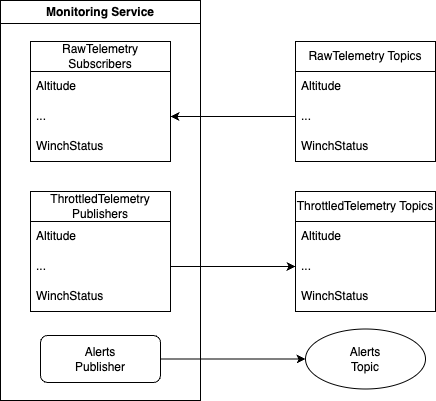
- Subscribes to the
RawTelemetry/* Topics - Publishes
ThrottledTelemetry/* Topics - Analyzes raw telemetry for alerting things and generates Alerts publishing them to the
Alerts Topic.
Uncrew Flight Controller Node
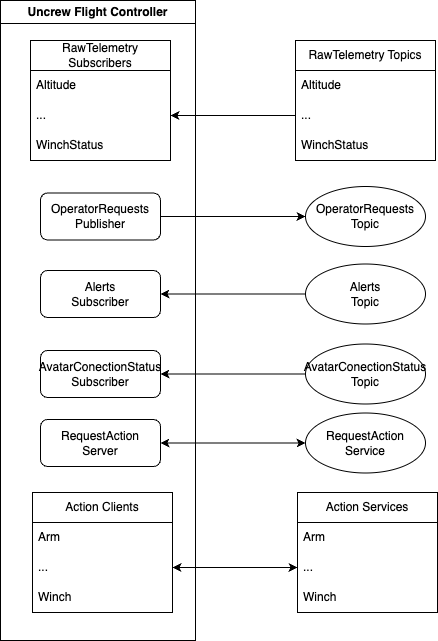
- Publishes operator requests to the
OperatorActionRequests Topic - Subscribes to the
OperatorActionRequestsAcknowledgements Topic - Subscribes to the
Alerts Topic - Subscribes to the
RawTelemetry/* Topics - Calls
Pathfinding Service - Implements
RequestAction Serviceto proxy C2Actions - Maps from Uncrew Mission to PX4 Mission, and later implements Uncrew Mission Flight Mode
- Assigns PX4 Missions
- Validates Missions
- Crouch
- Smart RTL
Mavlink Shim Node
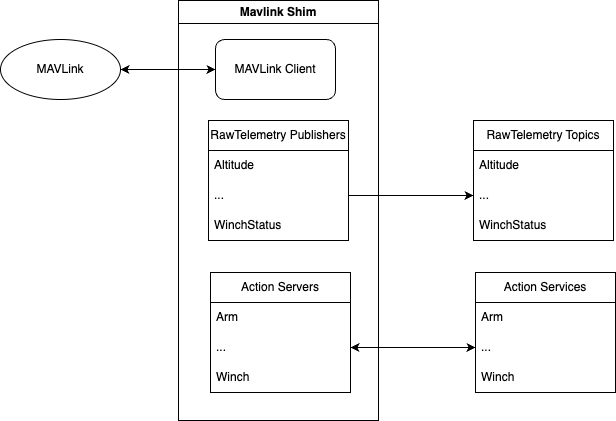
- Translates mavlink messages into ROS messages
- Publishes to the
RawTelemetry/* Topics - Implements C2
Action Service Servers - For some time until we learn how to write Uncrew Flight Mode, exposes PX4 mission mode
- Remains very simple and only does the mapping
ROS 2 Topics
Topics serve as a one-way communication pipe, and allow any number of nodes to subscribe to any number of topics.
Some topics will be “latched”, allowing late subscribers to receive the most recently published message.
These topics will be marked with “[Latched]” in the list below.
For more on how this is achieved please see the QoS settings in the docs.
Note that all topics generated by our services will be prefixed with /du/uncrew/.
| Topic | Message Type | IsLatched? |
|---|---|---|
| /du/uncrew/Alerts | Alerts | Yes |
| /du/uncrew/AvatarConnectionStatus | AvatarConnectionStatus | Yes |
| /du/uncrew/Certificate | Certificate | Yes |
| /du/uncrew/Configuration | Configuration | Yes |
| /du/uncrew/OperatorActionRequests | OperatorActionRequests | Yes |
| /du/uncrew/RawTelemetry/Altitude | TelemetryAltitude | No |
| /du/uncrew/RawTelemetry/Armed | TelemetryArmed | No |
| /du/uncrew/RawTelemetry/Battery | TelemetryBattery | No |
| /du/uncrew/RawTelemetry/CameraMode | TelemetryCameraMode | No |
| /du/uncrew/RawTelemetry/ConnectionEvent | TelemetryConnectionEvent | No |
| /du/uncrew/RawTelemetry/CurrentMissionItem | TelemetryCurrentMissionItem | No |
| /du/uncrew/RawTelemetry/DistanceSensor | TelemetryDistanceSensor | No |
| /du/uncrew/RawTelemetry/Error | TelemetryError | No |
| /du/uncrew/RawTelemetry/FlightMode | TelemetryFlightMode | No |
| /du/uncrew/RawTelemetry/GPSInfo | TelemetryGPSInfo | No |
| /du/uncrew/RawTelemetry/GimbalControlStatus | TelemetryGimbalControlStatus | No |
| /du/uncrew/RawTelemetry/Heading | TelemetryHeading | No |
| /du/uncrew/RawTelemetry/Health | TelemetryHealth | No |
| /du/uncrew/RawTelemetry/Imu | TelemetryImu | No |
| /du/uncrew/RawTelemetry/Odometry | TelemetryOdometry | No |
| /du/uncrew/RawTelemetry/PoseEuler | TelemetryPoseEuler | No |
| /du/uncrew/RawTelemetry/Position | TelemetryPosition | No |
| /du/uncrew/RawTelemetry/StatusText | TelemetryStatusText | No |
| /du/uncrew/RawTelemetry/UncrewFlightMode | TelemetryUncrewFlightMode | No |
| /du/uncrew/RawTelemetry/VelocityNed | TelemetryVelocityNed | No |
| /du/uncrew/RawTelemetry/VideoStreamSettings | TelemetryVideoStreamSettings | No |
| /du/uncrew/RawTelemetry/WinchReelStatus | TelemetryWinchReelStatus | No |
| /du/uncrew/RawTelemetry/WinchStatus | TelemetryWinchStatus | No |
| /du/uncrew/ThrottledTelemetry/Altitude | TelemetryAltitude | No |
| /du/uncrew/ThrottledTelemetry/Armed | TelemetryArmed | No |
| /du/uncrew/ThrottledTelemetry/Battery | TelemetryBattery | No |
| /du/uncrew/ThrottledTelemetry/CameraMode | TelemetryCameraMode | No |
| /du/uncrew/ThrottledTelemetry/ConnectionEvent | TelemetryConnectionEvent | No |
| /du/uncrew/ThrottledTelemetry/CurrentMissionItem | TelemetryCurrentMissionItem | No |
| /du/uncrew/ThrottledTelemetry/DistanceSensor | TelemetryDistanceSensor | No |
| /du/uncrew/ThrottledTelemetry/Error | TelemetryError | No |
| /du/uncrew/ThrottledTelemetry/FlightMode | TelemetryFlightMode | No |
| /du/uncrew/ThrottledTelemetry/GPSInfo | TelemetryGPSInfo | No |
| /du/uncrew/ThrottledTelemetry/GimbalControlStatus | TelemetryGimbalControlStatus | No |
| /du/uncrew/ThrottledTelemetry/Heading | TelemetryHeading | No |
| /du/uncrew/ThrottledTelemetry/Health | TelemetryHealth | No |
| /du/uncrew/ThrottledTelemetry/Imu | TelemetryImu | No |
| /du/uncrew/ThrottledTelemetry/Odometry | TelemetryOdometry | No |
| /du/uncrew/ThrottledTelemetry/PoseEuler | TelemetryPoseEuler | No |
| /du/uncrew/ThrottledTelemetry/Position | TelemetryPosition | No |
| /du/uncrew/ThrottledTelemetry/StatusText | TelemetryStatusText | No |
| /du/uncrew/ThrottledTelemetry/UncrewFlightMode | TelemetryUncrewFlightMode | No |
| /du/uncrew/ThrottledTelemetry/VelocityNed | TelemetryVelocityNed | No |
| /du/uncrew/ThrottledTelemetry/VideoStreamSettings | TelemetryVideoStreamSettings | No |
| /du/uncrew/ThrottledTelemetry/WinchReelStatus | TelemetryWinchReelStatus | No |
| /du/uncrew/ThrottledTelemetry/WinchStatus | TelemetryWinchStatus | No |
ROS 2 Services
Services represent remote procedure calls.
- RequestAction
ROS 2 Actions
Actions represent long-running remote procedure calls.
- Arm
- AssignMission
- ConfirmDeliveryComplete
- ConfirmDeliveryReady
- Crouch
- DropOff
- Hold
- Land
- Loiter
- ReturnToLaunch
- StartMission
- Takeoff
- Waypoint
- Winch
ROS 2 Messages
Data formats which define Actions, Services, and Topics.
- Alert
- AlertBattery
- AlertBatteryPercentage
- AlertFlightTermination
- AlertReaction
- AlertReactionNone
- AlertReactionRTL
- Alerts
- AvatarConnectionStatus
- C2Arm
- C2AssignMission
- C2ConfirmDeliveryComplete
- C2ConfirmDeliveryReady
- C2Crouch
- C2DropOff
- C2Hold
- C2Land
- C2Loiter
- C2ReturnToLaunch
- C2StartMission
- C2Takeoff
- C2Waypoint
- C2Winch
- Certificate
- Configuration
- Metadata
- MissionItem
- MissionPlan
- OperatorActionRequest
- OperatorActionRequestConfirmDeliveryComplete
- OperatorActionRequestConfirmDeliveryReady
- OperatorActionRequests
- ProcedureStatus
- TelemetryAltitude
- TelemetryArmed
- TelemetryBattery
- TelemetryCameraMode
- TelemetryConnectionEvent
- TelemetryCurrentMissionItem
- TelemetryDistanceSensor
- TelemetryError
- TelemetryFlightMode
- TelemetryGPSInfo
- TelemetryGimbalControlStatus
- TelemetryHeading
- TelemetryHealth
- TelemetryImu
- TelemetryOdometry
- TelemetryPoseEuler
- TelemetryPosition
- TelemetryStatusText
- TelemetryUncrewFlightMode
- TelemetryVelocityNed
- TelemetryVideoStreamSettings
- TelemetryWinchReelStatus
- TelemetryWinchStatus
- TypeAltitude
- UAVCommandDropOff
- UAVCommandLand
- UAVCommandLoiter
- UAVCommandTakeoff
- UAVCommandWaypoint
- WinchAbandonLine
- WinchDeliver
- WinchHold
- WinchLoadLine
- WinchLoadPayload
- WinchLock
- WinchRateControl
- WinchRelativeLengthControl
- WinchRelax
- WinchRetract
Data Flows
UAV Registration / mTLS Certificate
- The
Inventory Client Nodeuses the factory certificate on disk to establish a secure gRPC connection with theInventory Server’sUavService. - The
Inventory Client NodecallsRegisterNewUav, which returns a new certificate. - The
Inventory Client Nodeuses the new certificate to publish aCertificate Messageto thedu/uncrew/Certificate Topic. - The
Avatar Client Nodeis subscribed to thedu/uncrew/Certificate Topic, and so it receives theCertificate Message. - The
Avatar Client Nodeuses the received certificate to establish a secure gRPC connection with theAvatar Server.
Telemetry
We will explore the flow for telemetry in the system through an example using the Battery telemetry.
Note that this should be the same for the other telemetry types.
- Battery telemetry is generated by PX4.
- The
Mavlink Shim Nodereceives the PX4 Battery. - The
Mavlink Shim Nodeuses the received telemetry to publish aTelemetryBattery Messageto thedu/uncrew/RawTelemetry/Battery Topic. - The
Monitoring Service Nodeis subscribed to thedu/uncrew/RawTelemetry/Battery Topic, and so it receives theTelemetryBattery Message. - Every one second, the
Monitoring Service Nodepublishes the most recentTelemetryBattery Messageto thedu/uncrew/ThrottledTelemetry/Battery Topic. - The
Avatar Client Nodeis subscribed to thedu/uncrew/ThrottledTelemetry/Battery Topic, and so it receives theTelemetryBattery Message. - The
Avatar Client Nodeuses the received telemetry to call thePublishBattery RPCon theAvatar Server.
C2 Commands
We will explore the flow for C2 commands in the system through an example using the Arm C2 command.
Note that this should be the same for the other C2 commands except for Crouch.
- The
Avatar Client Nodereceives aSubscribeUAVCommandsResponse Messagefrom theAvatar Server’sSubscribeUAVCommands RPC, containing a C2 command to execute. - The
Avatar Client Nodeuses the received UAVCommand to call theRequestAction Service. - The
Uncrew Flight Controller Nodereceives the call toRequestAction, and calls theArm Action. - The
Mavlink Shim Nodereceives theArm Action Requestand responds when it is finished. - The
Uncrew Flight Controller Nodereturns the result of theArm Action Responseto as aRequestAction Response. - The
Avatar Client Nodeuses theRequestAction Responseto call theAvatar Server’sPublishUAVCommandResult RPC.
Note: for Crouch the Crouch Action Response is sent when the action is started, NOT when it is completed.
If errors occur during the execution, the Mavlink Shim Node publishes Error Messages to the du/uncrew/RawTelemetry/Errors Topic.
Operator Action Request
We will explore the flow for Operator Action Requests in the system through an example using the ConfirmDeliveryReady Operator Action Request.
Note that this should be the same for the other Operator Action Requests.
- The
Uncrew Flight Controller Nodedetermines that operator input is required, and publishes anOperatorActionRequestmessage to the/du/uncrew/OperatorActionRequests Topic. - The
Avatar Client Nodeis subscribed to the/du/uncrew/OperatorActionRequests Topic, and so it receives theOperatorActionRequest Message. - The
Avatar Client Nodeuses the received operator action request to call thePublishOperatorActionRequests RPCon theAvatar Server.
Alerts
We will explore the flow for Alerts in the system through an example using the AlertBatteryPercentage Alert.
Note that this should be similar for other Alerts.
Also note that this example will assume that the Telemetry Data Flow is currently active (i.e. telemetry is being sent throughout the system).
- The
Monitoring Service Nodeis subscribed to thedu/uncrew/RawTelemetry/Battery Topic, and so it receives theTelemetryBattery Message. - The
Monitoring Service Nodeanalyzes the content of theTelemetryBattery Message. - If the remaining battery percentage is below the configured threshold, the
Monitoring Service Nodepublishes anAlerts Message, containing all active alerts, to the/du/uncrew/Alerts Topic. - The
Avatar Client Nodeis subscribed to the/du/uncrew/Alerts Topic, and so it receives theAlerts Message. - The
Avatar Client Nodeuses the receivedAlerts Messageto call theAvatar Server’sPublishAlert RPC.
Consequences
As a consequence of this decision, there will be some amount of duplicated work.
Several of the services will encompass responsibilities which currently belong to the Mavlink Shim.
Since our intention is to create ROS 2 Nodes in Python first, we will have to reimplement many features.
However, we still feel it will save us time in the long run due to our improved ability to iterate and test compared to the existing monolithic architecture.
Alternatives Considered
Not Splitting the Mavlink Shim Yet
We have also considered not splitting apart the Mavlink Shim yet, and instead continuing to add features.
Then later, split apart the Shim when deadlines aren’t so tight.
We fear this would cause increasing larger delays in development and debugging, and that we will continue to “kick the can” in perpetuity.
A Hard Cut to New Architecture
We have also considered writing the entire onboard ROS 2 ecosystem first, and then cutting over from the existing Mavlink Shim to this new architecture all at once.
This was determined to be too expensive, as we would be bombarded with all bugs and defects at once.
Instead, we will iterate on the deployed architecture slowly and fix issues as they arise.