Avatar Telemetry

Originally
ADR-0106-Avatar-telemetry (v10) · Source on Confluence ↗Avatar Telemetry
Jira ticket - UNCREW-2535
Context
Currently, to receive telemetry from a number of avatars, Uncrew frontend establishes a separate connection each avatar. While this approach theoretically minimizes latency between the UAV and the pilot, it does not scale when dealing with tens of drones or more. To efficiently manage and display telemetry from potentially thousands of UAVs on a single screen, similar to Flightradar24, we need to develop a more scalable system.
At this moment we have 4 GRPC services in Avatar(Telemetry, Commands, Requests, Alerts). The last two services - Requests and Alerts - each serve only a single RPC endpoint and exist solely to distinguish telemetry data from data generated by onboard components.
On receiving telemetry from UAV we have a two streams in Avatar. First is broadcasting telemetry to all active listeners who is connected to avatar at this moment via GRPC. Second stream publish all telemetry to pubsub for transmit it to Mission service, store to GCS and send few types of telemetry to UTM(position, speed, heading).
Decision
Step 1: Avatar optimisation
To reduce number of connection to avatar and simplify code on client side(UI for example) we will merge Request and Alerts to Telemetry GRPC service. So all data that is comming from UAV we can receive from single endpoint and instead of making 3 connections to Avatar needs to have only one.
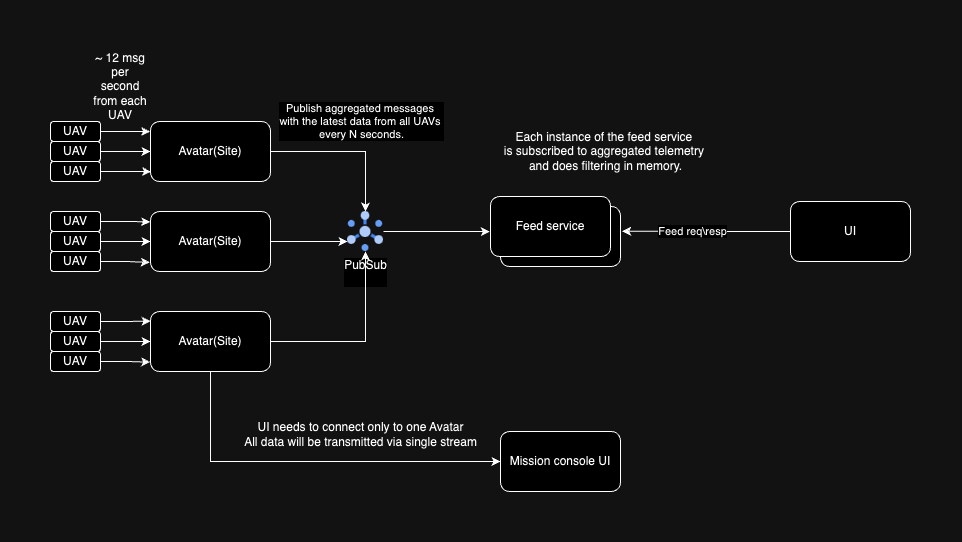
Step 2: Avatar per operational area(Site)
The UI Mission Manager and Mission Console use a Site view to monitor all UAVs currently online in a specific Site. Initially, the avatar system was designed to support multiple UAVs per avatar. However, we decided to deploy one avatar for each UAV to minimize the risk of losing connection to multiple UAVs if an issue occurred with a single avatar in the cloud. By switching to one avatar per Site, our UI can efficiently gather and display all necessary data from a single endpoint. This approach will require a few changes in existed services:
Inventory service:
- Add site id to UAV details
- Add endpoint to move UAV from one site to another one
Avatar controller:
- Reconcile single avatar per Site
Avatar:
- Support list of mTLS certs
Site should be assigned on UAV registration by manager and populate to avatar details for avatar controller.
Support for mTLS certificates in the Avatar application can be enhanced by utilizing a sidecar container within the same pod. This sidecar container is responsible for monitoring updates in Kubernetes Avatar resources. It dynamically manages the certificates by adding or removing them from an emptyDir volume based on these updates. Meanwhile, the main Avatar container monitors these file updates in the shared volume and refreshes the certificates in its memory accordingly. By employing a sidecar container, we offload the task of communicating with the Kubernetes API from the Avatar container, thereby dedicating the Avatar to its primary functionalities and improving overall system efficiency.
Domain per UAV or per Site?
Currently, we utilize a wildcard domain in Cloudflare (CF) for all UAVs, alongside a unique domain per UAV configured in Kubernetes ingresses for routing purposes. When a UAV switches Sites, it must reconnect to a new avatar, and we continue to leverage the separate domain per UAV. This approach delegates all routing challenges to the avatar controller and Kubernetes ingress.
However, using unique domains per UAV might potentially strain the Kubernetes ingress controller if there is a high volume of UAV movements between Sites. To address this, we could consider introducing a single domain per Site for UAV-to-Avatar communications, which would simplify routing but also necessitate reissuing certificates whenever changes occur.
For now, we will maintain the current configuration with individual UAV domains. If we encounter performance issues with the Kubernetes ingress controller due to bulk UAV movements, we will reassess and possibly switch to a Site-based domain approach to optimize system performance.
Step 3: Aggregate telemetry from all Sites(Feed service)
To achieve our goal of building an API that supports a UI displaying all active UAVs, we can implement a separate service dedicated to aggregating telemetry data for each UAV. Each avatar will generate a single message per UAV containing only essential information such as position, speed, and heading, and then publish it to a Pub/Sub topic.
The “Feed Service” will offer two API endpoints:
- Request/response endpoint that provides aggregated telemetry data.
- Server stream endpoint that continuously delivers telemetry updates.
This approach will ensure that the UI has access to real-time and relevant UAV data, making it both efficient and effective for monitoring purposes.
To efficiently manage telemetry from all connected UAVs, the Avatar is designed to aggregate telemetry into a single message. This message will consist of a list of telemetry snapshots, with one snapshot per UAV. Each snapshot will contain only the essential data required for monitoring and will be published to a Pub/Sub topic every second, though this frequency is configurable.
The Feed Service will continuously subscribe to this Pub/Sub topic. The subscription rate will match the number of Sites per second, ensuring timely data delivery. In scenarios where there is one UAV per Site, the traffic rate will effectively be one message per UAV per second.
This architecture ensures efficient and scalable telemetry data management, suitable for real-time monitoring of all UAVs across different Sites.
Example:
message Feed {
    repeated FlightData = 1;
}

message FlightData {
    types.v1.UavID uav_id = 1;
    string mission_id = 2;
    string site_id = 3;
    google.protobuf.Timestamp time = 4;
    types.v1.Position2D position_2d = 5;
    units.v1.Meters altitude_msl_meters = 6;
    etc...
}
The timestamp in each telemetry snapshot will correspond to the timestamp of the most recently received telemetry data for each UAV. If telemetry data is only updated occasionally, the Avatar will ensure that it always contains the latest received values.
This setup allows client applications to determine potential telemetry interruptions. By comparing the timestamp in the telemetry data with the current time (time.Now()), the application can identify if there has been a loss of telemetry from any UAV, ensuring timely detection and response to data interruptions.
The Feed Service is tasked with filtering data based on specific criteria such as location and Sites, ensuring that only relevant flight data is delivered to client applications. The maximum number of flights to be displayed can be configured within the application. For instance, a service like Flightradar24 typically displays around 1,500 flights, with the payload size of each response approximately 40kb. Any data exceeding these limits should be truncated from the response, while maintaining an accurate representation of flight density per Site. This approach ensures that client applications receive manageable and pertinent data, enhancing both performance and usability.
Consequences
Adopting a unified feed service that aggregates and filters flight telemetry data presents several positive outcomes:
- Enhanced Efficiency: Centralizing data management allows for streamlined operations and better resource utilization, ensuring that client applications receive only relevant and optimized data.
- Improved User Experience: Implementing a cap on the number of displayed flights, like Flightradar24, ensures a manageable and responsive interface for users, enhancing their overall experience.
- Architecture and Frontend Load Reduction: The first two steps not only enhance the current architecture but also reduce the load on the frontend application by simplifying API interactions and reducing the number of active connections. This paves the way for the third step.
- Enabling Comprehensive UI Features: Implementing the third step unblocks the potential to develop a UI that displays all active flights, enhancing the capability to manage and monitor extensive flight data effectively.
Alternatives Considered
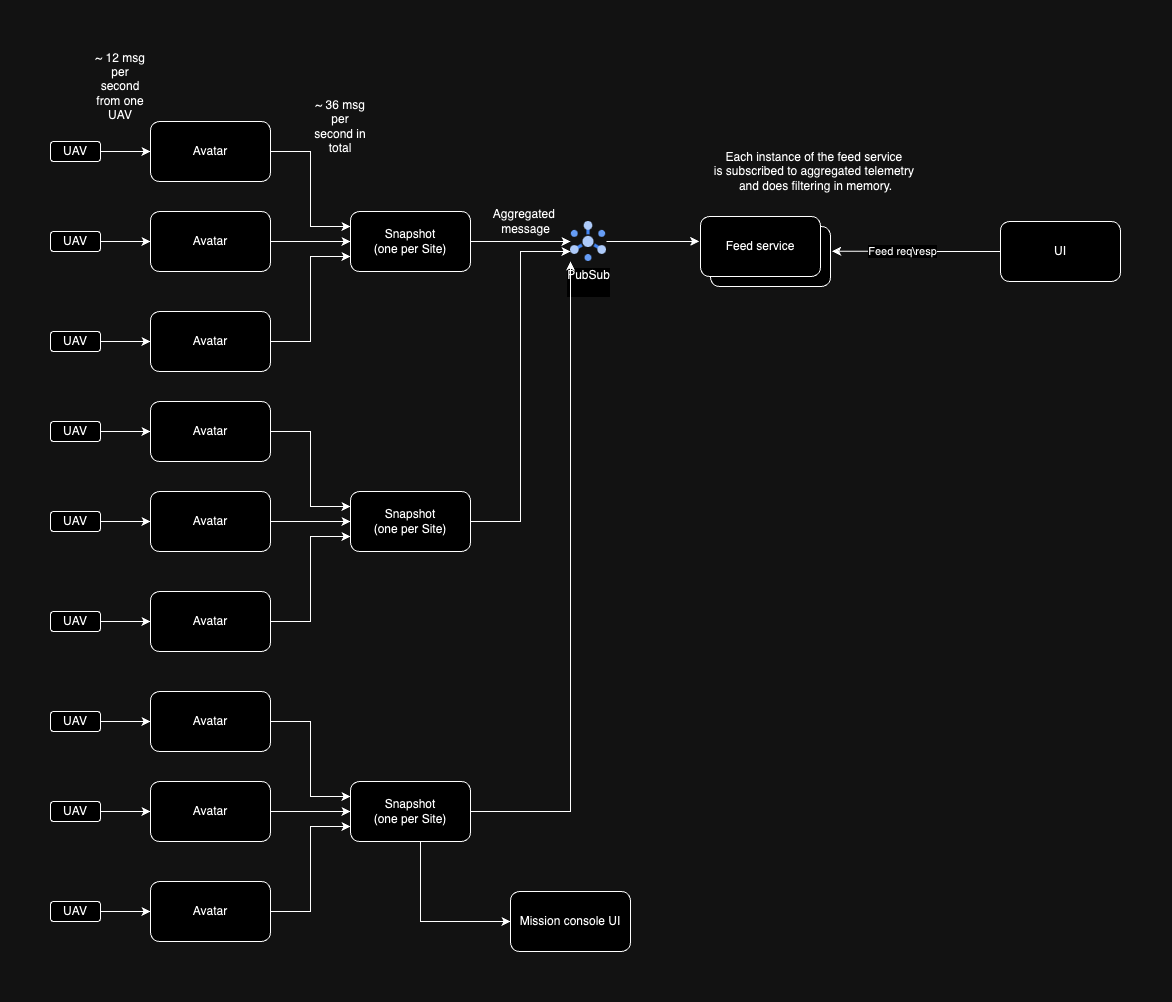
In september 2023 we had a proposal to create a snapshot service for aggregate all telemetry from avatars in one place.
Main problems which we discovered:
- Problems with load balancing connections between avatars and snapshot service
- Scailing problems
- Extra latency between pilot and avatar
- etc…
Whole converation available here - https://github.com/droneup/uncrew-architecture/pull/28
If we reduce the scope of responsibility of the snapshot service to one Site, this solution will closely align with the one proposed above.
Pros:
- It solves problem with connections that we had in original proposal
- Requires small changes to avatar
- Isolate flights from affecting one another (if an avatar crashes only one flight is affected);
- Avatars consuming small amount of resources are less likely to be moved (by k8s) to another node. Moving a small spec of a footprint doesn’t rebalance resource consumption so k8s won’t be compelled to do it.
- An avatar shouldn’t be updated (redeployed) mid-flight. if one avatar serves one vehicle, there is a clear time window when the redeployment can happen. If one avatar serves more vehicles, there likely isn’t a time window available until the end of shift.
- If someone manages to get their hands on mTLS certs of an UAV and impersonate it, they could attack the avatar and affect the whole site.
Cons:
- This approach more like microservice aproach when we fixing a problem by creating a new service.
- Set a replica set to snapshot service means multiply load to cpu and memory in N times where N it’s replica count because all replicas should receive all data from avatars. So we can say - snapshot service does not support replication.
- Snapshot service needs to handle all telemetry from all UAVs connected to Site, so it’s basically double cpu\memory consumption for the same amount of telemetry messages from UAV.
- More services in k8s means we will hit a k8s limits faster. For 5 Sites with 5 UAVs in each Site we need to deploy 30 services in k8s(25 avatars + 5 snapshot services) vs 5 services if we use avatar per Site.