Updating Mission Plan Visualization On Frontend

Originally
ADR-0113-Updating-Mission-Plan-Visualization-On-Frontend (v5) · Source on Confluence ↗Updating Mission Plan Visualization on Frontend
Jira tickets:
Background
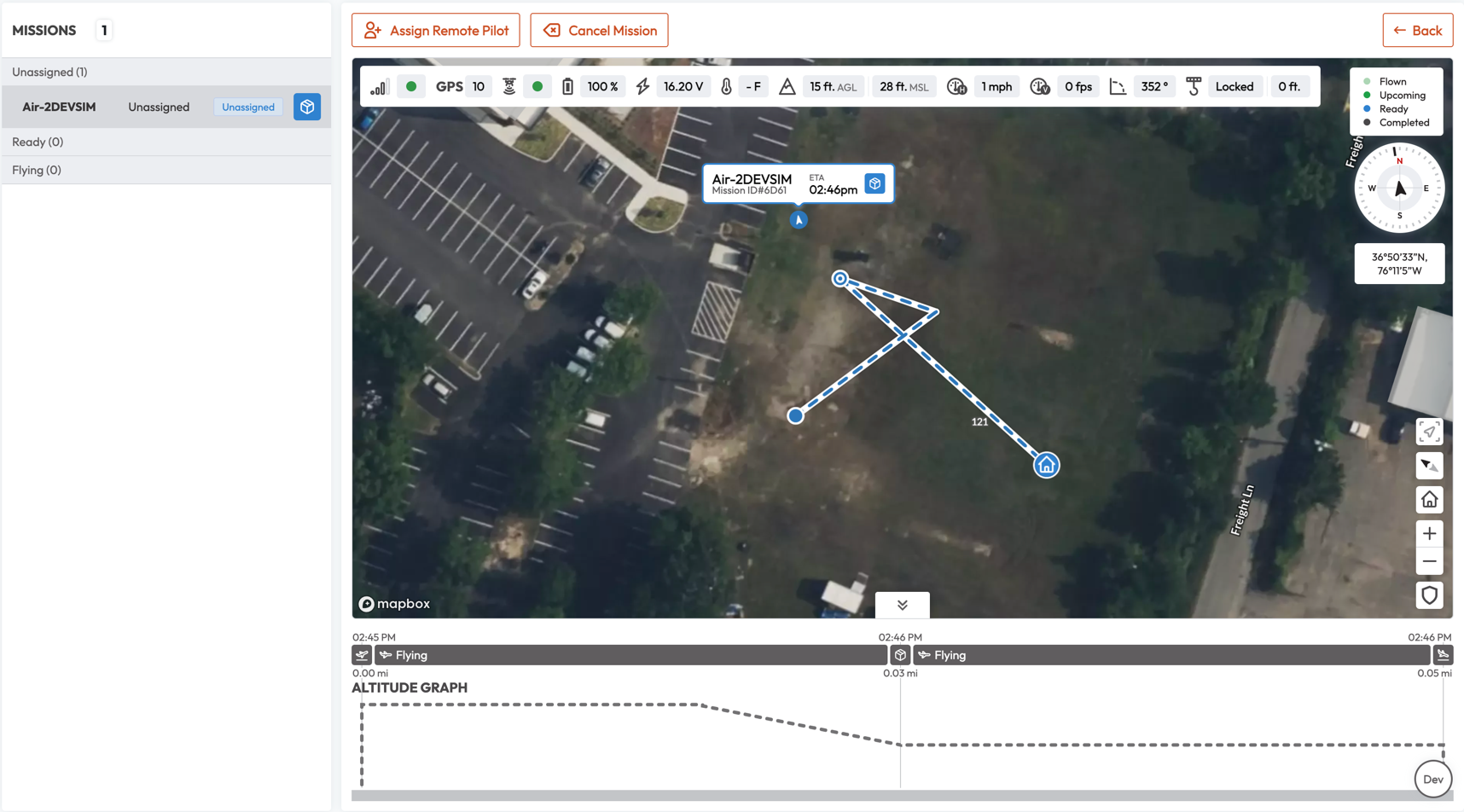
On the Frontend side we want to support Mission Plan changes. Currently, every Mission contains one desired plan, which is represented on the Frontend Side in following features:
Map - displays multiple Missions that are assigned to the Remote Pilot (in Mission Console) or are in the scope of one HUB (Mission Manager). Every Mission on the map is visualized by:
- Planned route - the initial desired plan including waypoints like Landing, DropOff, Spin360 and Loiters
- Flown route - every position telemetry that is received from the UAV is stored and connected into one line, indicating the actual route UAV has flown.
- Current UAV position - last received position telemetry, indicated by the Drone Icon.
- All of the above are colored, based on the current Criticality, Uncrew Flight Mode and Mission Status, which means that in case of Contingency, we change how the route and icons looks like to give a feedback to the user.
Graph - displayed for selected Mission, consists of multiple elements:
- Current Progress of the Mission - represents how far in the Mission is the UAV.
- Current, past and desired altitude of the UAV.
- Estimated Time Arrival at specific Objectives.
Missions List - Mission Items change based on the Mission Status, Criticality and Uncrew Flight Mode.
Notifications - Popup messages that are displayed on the top of the Application, that inform the user about various state changes of the Mission. For example:
- New Mission (Mission Manager) - displayed if the Mission Status is Submitted and no previous Mission with the same Mission ID is in the store.
- Assigned Mission (Mission Console and Mission Manager*) - displayed if there was no Mission with the same Mission ID on the Mission Console, or for Mission Manager if the user was a Supervisor who assigned the Mission,
- Timeout Mission (MM and MC) - it is displayed if the Mission Status is Submitted and there was a Mission with the same Mission ID which was Assigned.
- Complete Mission (MC) - displayed when the Mission changes status to Completed,
- Aborted Mission (MC and MM) - displayed when the Mission changes status to Aborted,
- Canceled Mission (MC and MM) - displayed when the Mission changes status to Canceled,
- Different kind of Alerts (MC and MM) - alerts are based on the alerts telemetry.
Example visualization of Mission Plan:
On the Frontend side there are multiple sources of the Mission State and its progress:
Mission Plan - informs about planned path and objectives that UAV will fly to. It is coming from Mission Service.
UAV Telemetry - coming from the Avatar for specific UAV:
Position - last known position and altitude of the UAV.
Uncrew Flight Mode - returns a status of the UAV, such as “Flying”, “Hold”, “Delivery”, “Contingency”.
PX4 Flight Mode - returns a mode in which is the UAV, coming from PX4. There are various of Flight Modes.
- One issue with PX4 Flight Mode is that it cannot differentiate Return to Launch and ALZ Safety Landing.
Requirements
To support updating Mission Visualization Frontend needs to receive new version of the Mission Plan, and additionally there has to be at least one Mission Plan marked as ‘desired’.
Desired Mission Plan is a plan that was issued before Mission has started. There can be multiple ‘desired’ Mission Plans, but FE should only use and display last ‘desired’ Mission Plan, as this is the one that were used to operate a Mission.
Any Mission Plan that was issued after Mission has started is not marked as ‘desired’.
Current Mission Plan is last Mission Plan.
Before any new Mission Plan is issued after Mission has started, ‘desired’ Mission Plan and ‘current’ are the same Plan.
Both current Mission Plan, and desired Mission Plan has to be visualized on the FE. There can be Missions that will have no new Mission Plan.
Mission Service have to provide new Mission Plan for every Contingency Mission Plan that has happened. All of those Contingency Mission Plans will be displayed on the Map, but only last one will be used to be rendered on the Graph.
The only case where Mission Service will for sure not issue new Mission Plan is Land in Place contingency, for which the Frontend will display overlay on the Graph with the information that the Land in Place is in progress.
Every new Mission Plan that is not ‘desired’ should be treated on the Frontend side as Contingency Mission Plan, therefore highlighted on the Map with the appropriate color.
Frontend needs to know when the Contingency Mission Plan started, to know which past positions should be marked as Contingency and which as not.
Frontend needs to know from one single source what Contingency is currently in progress. Right now Uncrew Flight Mode in combination with PX4 Flight Mode is used for this purpose (which is treated as a single source, since it is Telemetry stream) and it would be most beneficial for Frontend if Uncrew Flight Mode would be extended to support other types of Contingencies.
Decision
There are different reasons why Plan can change:
Recalculation of the Plan when the user invokes ‘Recalculate Route’ function (not yet connected)
Invoked by the user Contingencies or by Automated Failsafes:
- Return to Home,
- Safety Landing (ALZ),
- Land in Place (this one does not actually cause recalculation of the plan, therefore new Mission Plan will NOT be submitted)
Frontend have to change Mission Plan Visualization on the Map, Graph, Mission List and additionally display Notification for the User when the change happens (check Background for more information about how those features are represented).
Frontend will have to display desired Mission Plan and every new Mission Plan not marked as ‘desired’ on the Map. It includes also past positions of the UAV and highlighting with the specific color those positions that were flown to with the not-desired Mission Plans.
Frontend will exchange the Mission Plan represented on the Graph with the latest one, and display only that one Plan. As discussed on sync meetings, Frontend will not merge Mission Plans together, as it is not required. This may change in the future.
Frontend will display Notification whenever any Contingency or Automated Failsafe will occur.
Frontend will change how the Mission is displayed on the Missions List whenever any Contingency or Automated Failsafe will occur.
If for any reason Frontend will not receive new Mission Plan, but the combination of Uncrew Flight Mode and PX4 Flight Mode will suggest that there is in fact Contingency going on, Frontend will not display new Mission Plan on the Map, and the Graph will not be rendered, instead there will be information about Contingency in progress.
Cases when it can happen:
- Mission Service didn’t receive for any reason information about Contingency and requirement of new Mission Plan (any networking issues falls into this category as well)
- Pathfinder didn’t create new path, and UAV has triggered JeffRTL.
- Land in Place has started
Risks
Currently, there is no way to easily differentiate ALZ Safety Landing and Return to Land, as both Uncrew Flight Mode and PX4 Flight Mode will be the same for both cases. The only difference will be in Mission Plan. Return to Land will have the same Landing position as the desired Mission Plan, where’s the ALZ Safety Land will have different Land position than the desired Mission Plan.
While this condition could be used for displaying on the Map and the Graph difference in contingencies, it cannot be used in Notifications, as we are risking race condition. If the Telemetry will get quicker to the Frontend than new Mission Plan, Frontend will display that the Return to Launch is in progress, not the Safety Landing. This is why it would be best to contain this information on Telemetry side instead.