0006 - Demo Script: Military — Range Management — Fort Campbell

CONFIDENTIAL | DroneUp | April 2026
1. Purpose
Provide a complete, rehearsable demo script that walks a presenter through the ATOMx platform from the perspective of a range management authority at Fort Campbell, KY. The audience is Army procurement evaluators and their advisors assessing airspace management infrastructure for UAS training operations.
Target runtime: ~20 minutes.
What We Are Selling
We are selling airspace sovereignty for the modern range — a machine-verifiable, real-time classification of every aircraft in the operational picture, with the authorization infrastructure and incident response tools to manage the full complexity of simultaneous, multi-class UAS operations.
“Today, your response is only as fast as your slowest radio call. We’re here to show you what happens when that changes.”
Demo Perspective
The demo is presented from the range authority’s point of view — not the pilot’s. The audience cares about the value proposition to decision-makers responsible for range safety, throughput, and operational readiness.
What Is Different From the Standard Demo
This script replaces civilian jurisdiction framing (Somerville, MA / Fort McNair) with a range management context specific to Fort Campbell. Key differences:
- Setting is Fort Campbell, KY — home of the 101st Airborne, largest Army UAS training program
- Trust levels are framed around range throughput and operational cost, not counter-UAS detection
- New scenes: range zone design, swarm operations, GPS glitch recovery
- USS/UTM/FAA/LAANC ecosystem references removed
- Correlated layer sourced from RFMSS and flight planning services, not InterUSS alone
2. User Roles
| Role | Screens | Purpose in Demo |
|---|---|---|
| Pilot / Operator | My Flights, Profile | Pre-configured before presentation begins |
| Range Authority | Flight Review, Range Configuration | Shown live during Scenes 3 and 4 |
| Observer / Authority | Live Map (with Demo Controls) | Primary demo surface |
3. Pre-Demo Setup
Complete these steps before the presentation begins. The audience should never see setup.
3.1 Environment
- Target environment: dev (
apollo.uncrew.dev.droneup.cloud) - Confirm Live Map loads and shows Fort Campbell range boundary
- Confirm demo controls pull-out panel is functional
- Verify navigation suppressed to demo-safe items — hide: Mission Console, Mission Manager, Vehicle Manager, Settings, Mission Planner
3.2 Pre-Configured Data
| Item | State | Notes |
|---|---|---|
| Fort Campbell range boundary | Visible | Dashed white perimeter on map |
| 1 unknown flight (red dot) | Running | Moving on map when audience arrives |
| Remote ID trigger | Ready | Transitions red → orange |
| RFMSS flight intent | Ready to inject | Transitions orange → yellow; attributed to RFMSS event |
| 1 authorized flight (software identity) | Pre-authorized | Blue dot |
| 1 authorized flight (hardware identity) | Pre-authorized | Green dot |
| Non-conformance trigger | Ready | Makes green dot drift toward LM corridor |
| Range zones (3) | Pre-configured | UAS training, rotary wing, loitering munitions |
| RFMSS LM event | Pre-loaded | Countdown visible in LM corridor; ID: FC-2026-04-14-LM-007 |
| Swarm (8 aircraft) | Ready to trigger | Batch-authorized, all L5, SGT. Rivera operator |
| GPS glitch trigger | Ready | Makes AC-06 drift non-conformant toward LM boundary |
| Airspace action trigger | Ready | Issues exclusion boundary around AC-06 |
3.3 Aircraft Registration
| Aircraft | Identity Level | TPM Status | Notes |
|---|---|---|---|
| ATOMx Alpha | Software verified | Software certificate | L4 blue dot scenario |
| ATOMx Bravo | Hardware verified | TPM attested | L5 green dot scenario |
| AC-01 through AC-08 | Hardware verified | TPM attested | Swarm — batch authorized |
4. Demo Flow
Total target time: ~20 minutes.
Scene 1: The Problem (~2 min)
Opening screen
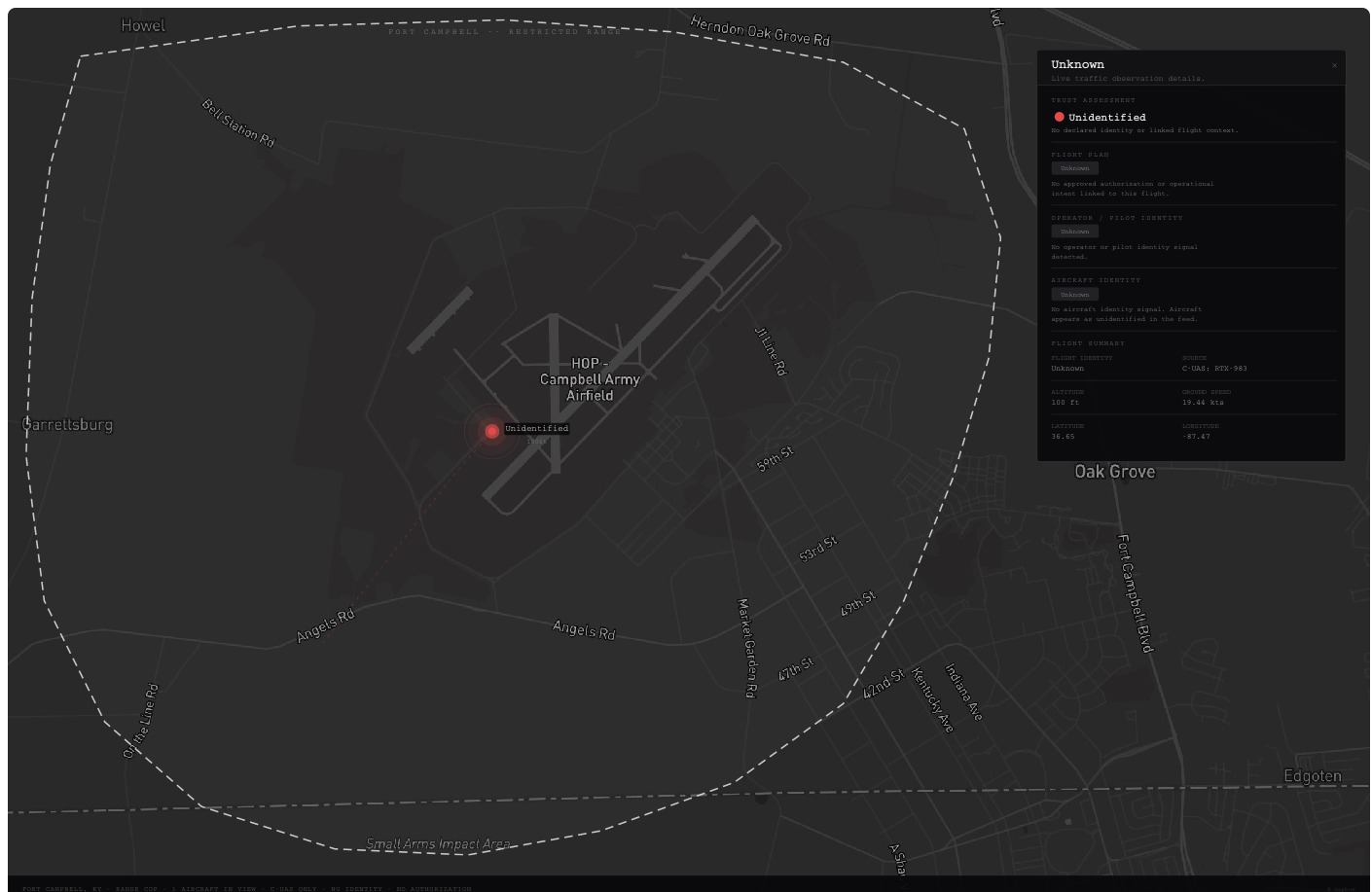
The Live Map is already on screen when the audience arrives. Fort Campbell range boundary visible as a dashed white perimeter. Dark map. A single red dot moves slowly across the range. No legend, no panels, no labels.
The presenter stands in front of the screen and does not reference the UI yet.
Talk track:
“Fort Campbell runs the largest Army UAS training program in the country. On any given training day, you have Groups 1 through 3 UAS at low altitude, rotary wing up high, and occasionally loitering munitions exercises that have historically required shutting the entire range down.”
“Managing all of that today means a lot of coordination overhead — flight schedules, radio calls, manual deconfliction. Your range control officers are good at it. But every one of those coordination touchpoints is a place where things can go sideways, and when they do, your response is only as fast as your slowest radio call.”
“What we’re going to show you today is what it looks like when that coordination overhead drops to near zero. But to get there, we need to talk about trust.”
Click the red dot. Detail panel opens — all fields unknown.
“This is your starting point. Let’s build the picture.”
Scene 2: Trust Levels (~5 min)
Walk through each trust level using a different aircraft. The legend is always fully visible. The core argument at each layer: what does this trust level cost you operationally?
Layer 1 — Unidentified (red)
The red dot is already running on the map.
Talk track: “This is your starting point. A counter-UAS sensor detected something. No identity. No intent. No authorization. Just a signal.”
Click the red dot. Show detail panel — all fields unknown.
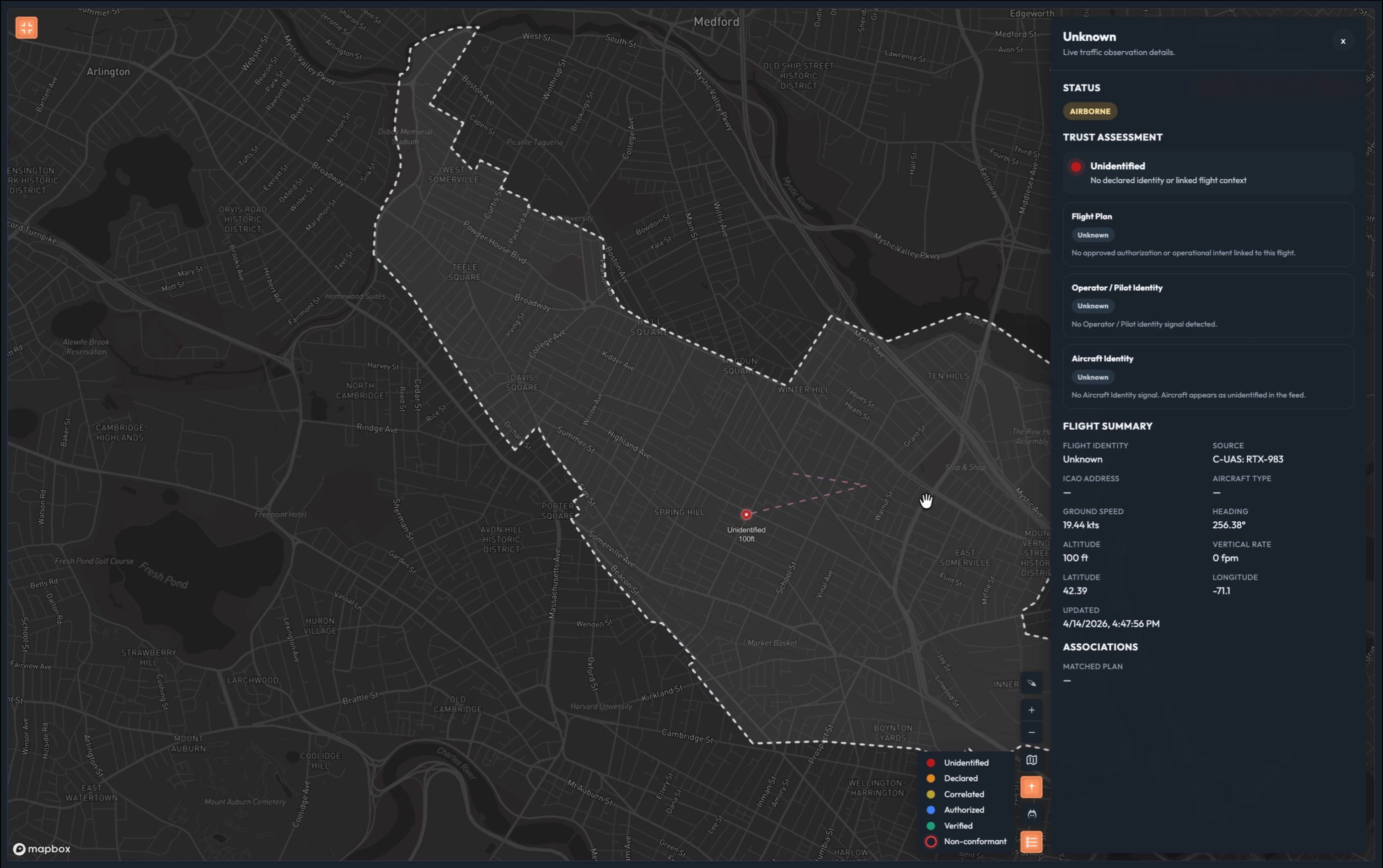
Talk track: “In range management terms, this is a full stop. You don’t know if this is one of yours that lost its data link, a negligent operator who wandered in, or something worse. Until you know, you can’t safely run anything else in that airspace. One unidentified aircraft and your entire range tempo grinds to a halt. That’s the most expensive dot on this map.”
Layer 2 — Declared (orange)
Press Fly Declared. Dot transitions red → orange.
Talk track: “Now we have a Remote ID signal. The aircraft is broadcasting an identity and a pilot name.”
Click the orange dot.
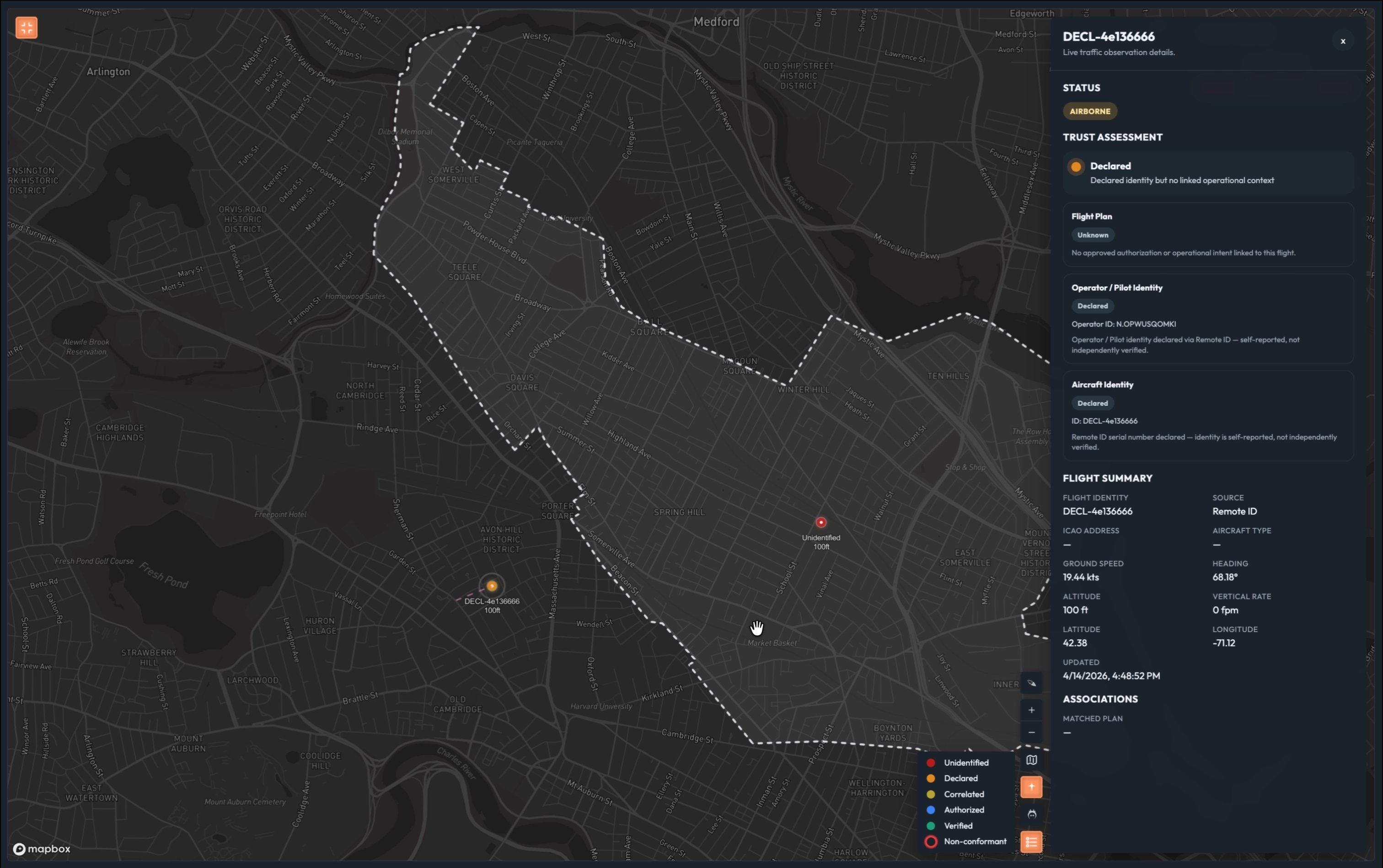
Talk track: “Self-reported. No one checked. This is the digital equivalent of someone calling range control and saying ’that’s my drone.’ You have a name, but you have no way to confirm it’s real, no flight plan on record, and no authority has approved this operation.”*
“This is actually where most range operations live today. Your flight schedules, your radio check-ins — those are declared systems. Someone told you they’d be there, and you took them at their word. That works until it doesn’t.”
“Still a significant disruption if you encounter this unexpectedly. You’re making phone calls, pulling your range control officer off other tasks, slowing everything down.”
Layer 3 — Correlated (yellow)
Press Insert Flight Intent. Yellow polygon appears. Dot transitions orange → yellow.
Talk track: “Now we have a flight plan. Filed through RFMSS or a flight planning service — ATOMx matched it to this telemetry signal automatically.”
Click the yellow dot.
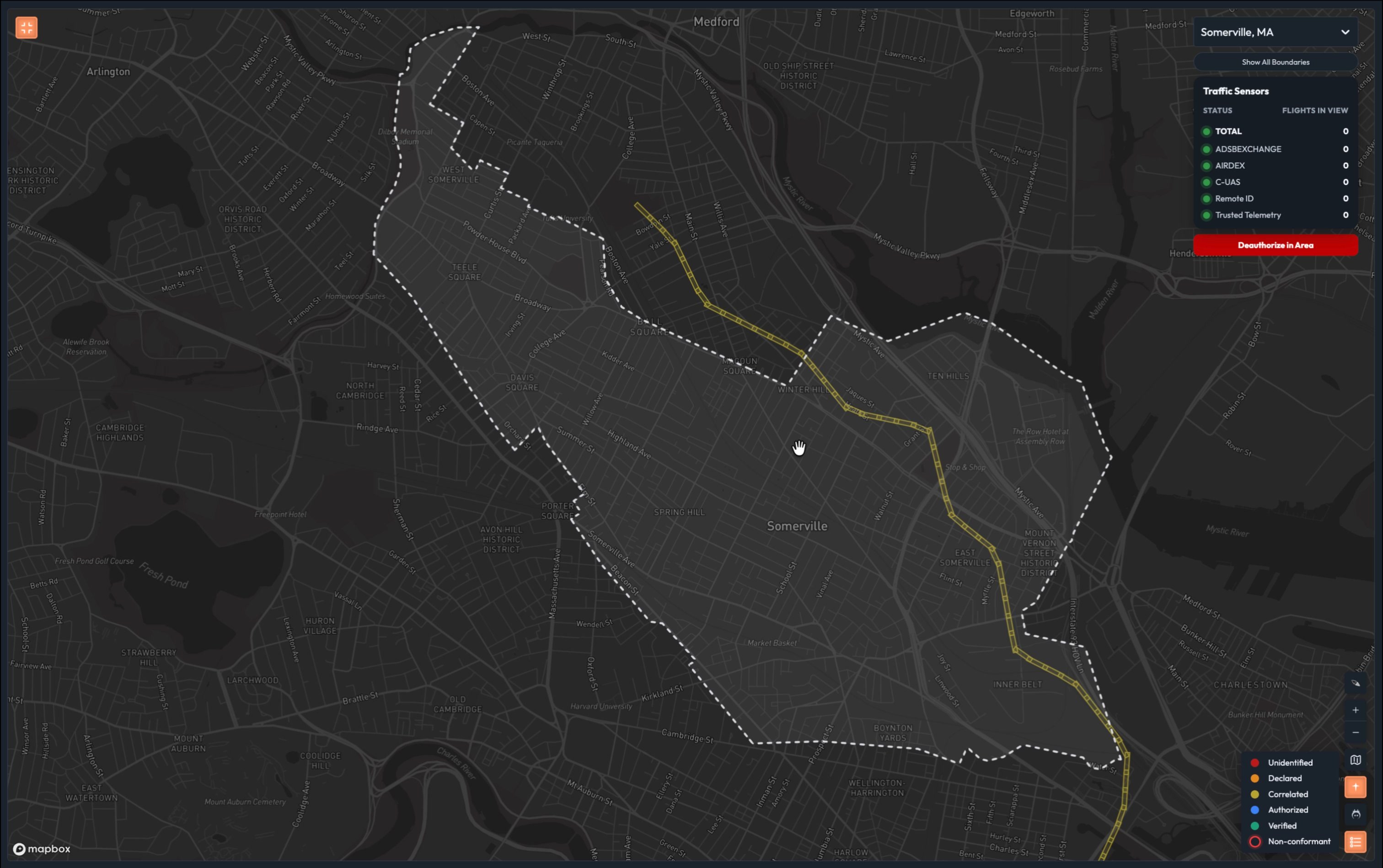
Talk track: “Better. You have context. But filing a plan doesn’t make you trusted — it makes you expected. Nobody has verified who this pilot is, nobody has confirmed the aircraft is what it says it is, and no authority has formally approved this operation. If something goes wrong here, you’re still chasing it down manually.”*
Layer 4 — Authorized (blue)
Press Fly Software-Verified Sim. Blue dot appears.
Talk track: “This flight came through the ATOMx authorization system. The pilot’s identity has been verified through a trusted identity provider. The aircraft has a software credential — validated automatically. And every authority whose airspace this flight touches has reviewed and approved it.”
Click the blue dot.
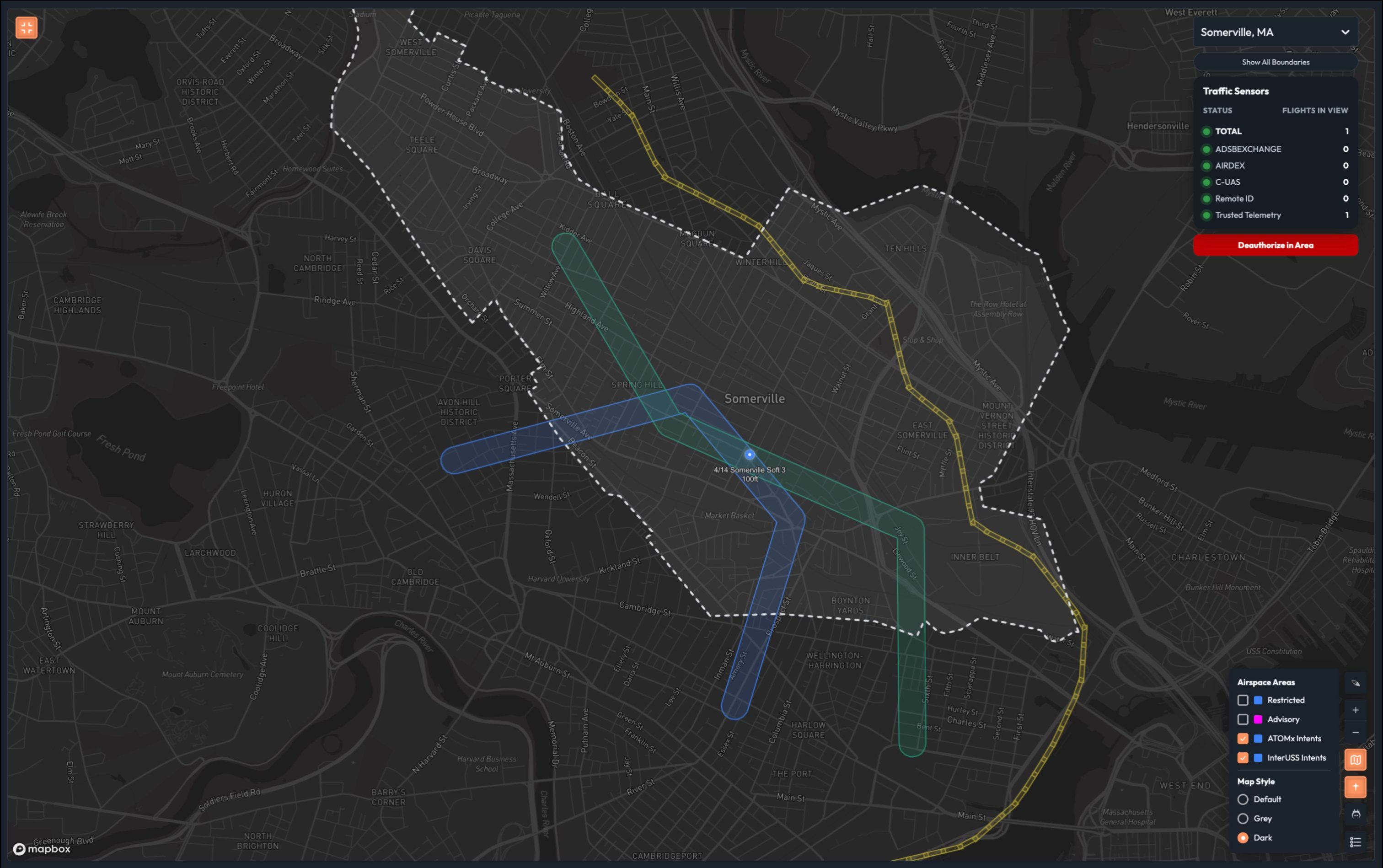
Talk track: “Verified pilot. Credentialed aircraft. Formally authorized. Every piece of that is machine-verifiable — same inputs, same answer, every time, in milliseconds.”*
“This is the threshold that matters for range management. An authorized flight gets its corridor and stays in it. Your range tempo starts to recover here.”
Layer 5 — Verified (green)
Press Fly TPM Sim. Green dot appears.
Talk track: “This aircraft has a hardware-backed identity — a trusted platform module physically bound to the airframe. You can’t spoof it. You can’t clone it. The signal you’re seeing and the aircraft that was authorized are provably the same thing.”
Click the green dot.
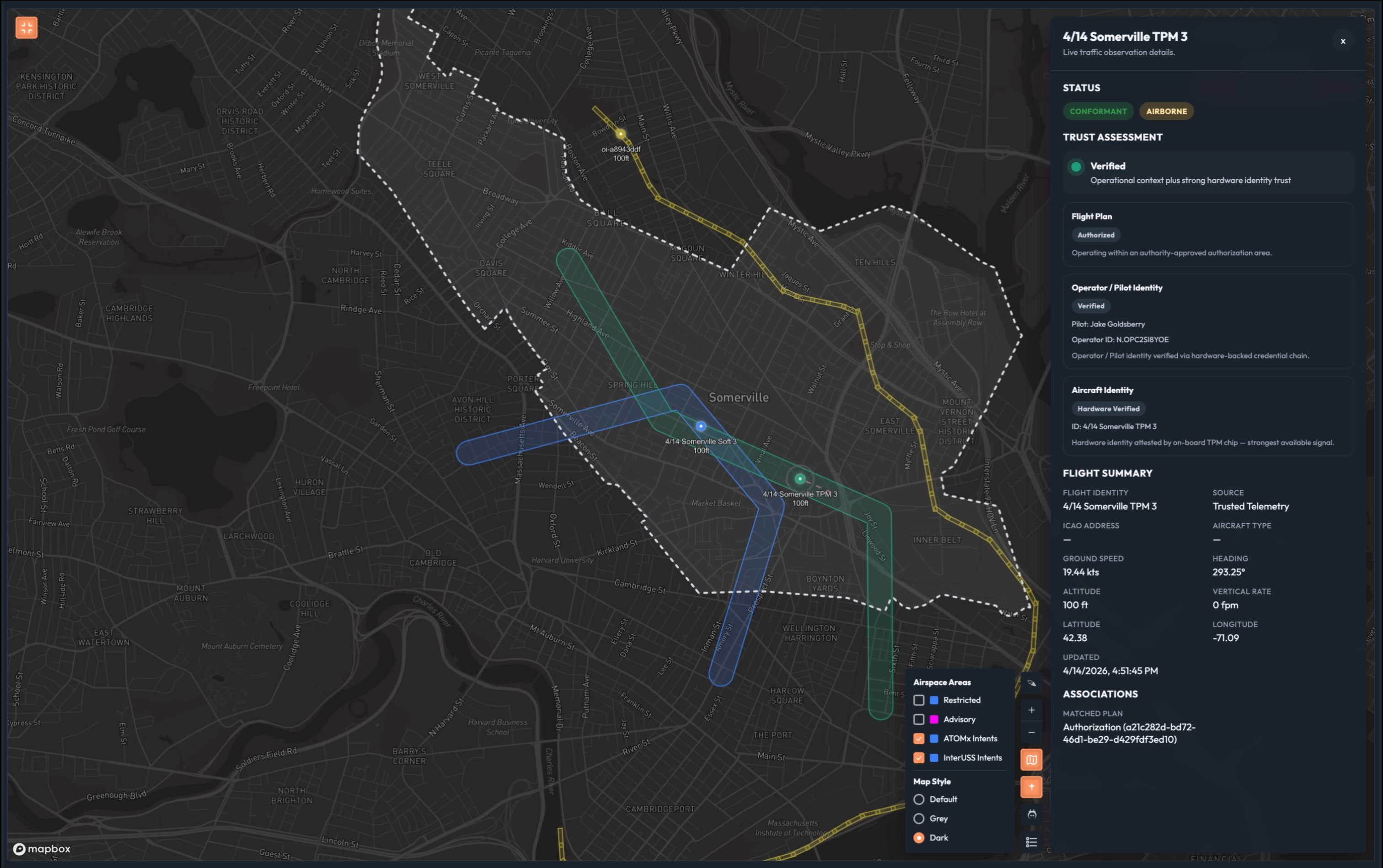
Talk track: “This is non-repudiation. Not ‘we think this is the right aircraft.’ We know.”*
“And here’s what that certainty buys you operationally: this aircraft earns the tightest operating envelope on your range. The 2,000-foot horizontal bubble the FAA requires around an unidentified UAS exists because nobody knows what it’s going to do next. An L5 aircraft — verified identity, authorized flight plan, hardware-attested telemetry — has earned a much smaller footprint.”
Show density comparison diagram.
“The difference between a range running primarily red and orange dots and one running primarily green is not just a safety story. It’s a sortie capacity story. It’s how many pilots you can train in a day.”
“That’s the range we’re building toward.”
Scene 3: Intent Authorization (~2 min)
The authorization panel
Switch to the range authority browser. Open Flight Review.
Talk track: “Everything we just saw on the map — the blue dot, the green dot — those came from somewhere. This is where the range authority works.”
Show the pending requests queue.
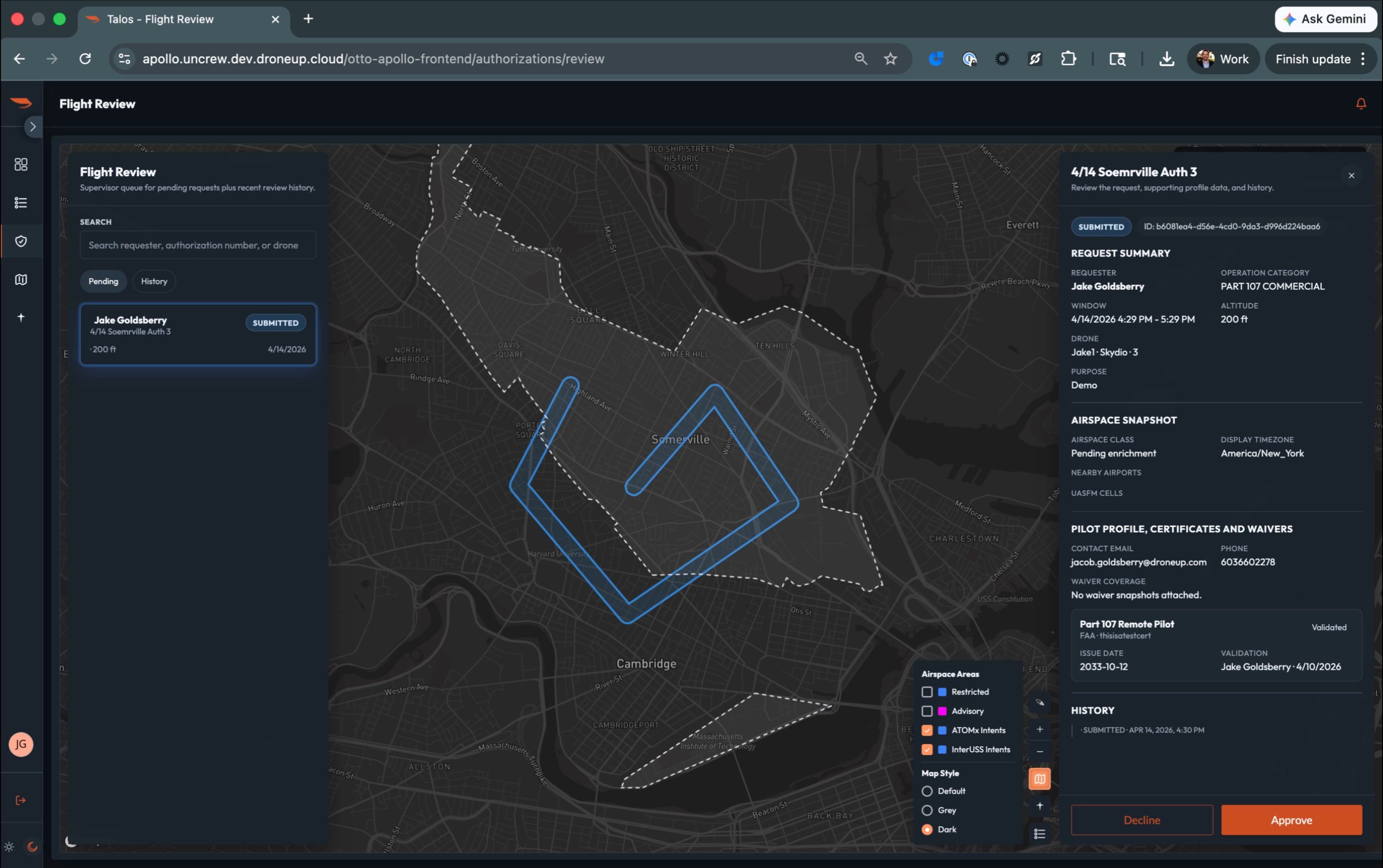
Talk track: “Every UAS operation on this range starts here. A pilot submits a request — the aircraft, the area, the time window, the altitude. The authority reviews it against everything else scheduled on the range. If it fits, they approve it.”*
Approve a flight. Pilot notification appears.
“The pilot is notified immediately. The system records the authorization with a unique ID. From this point forward, that aircraft is blue on the map.”
Point to pilot certificate validation.
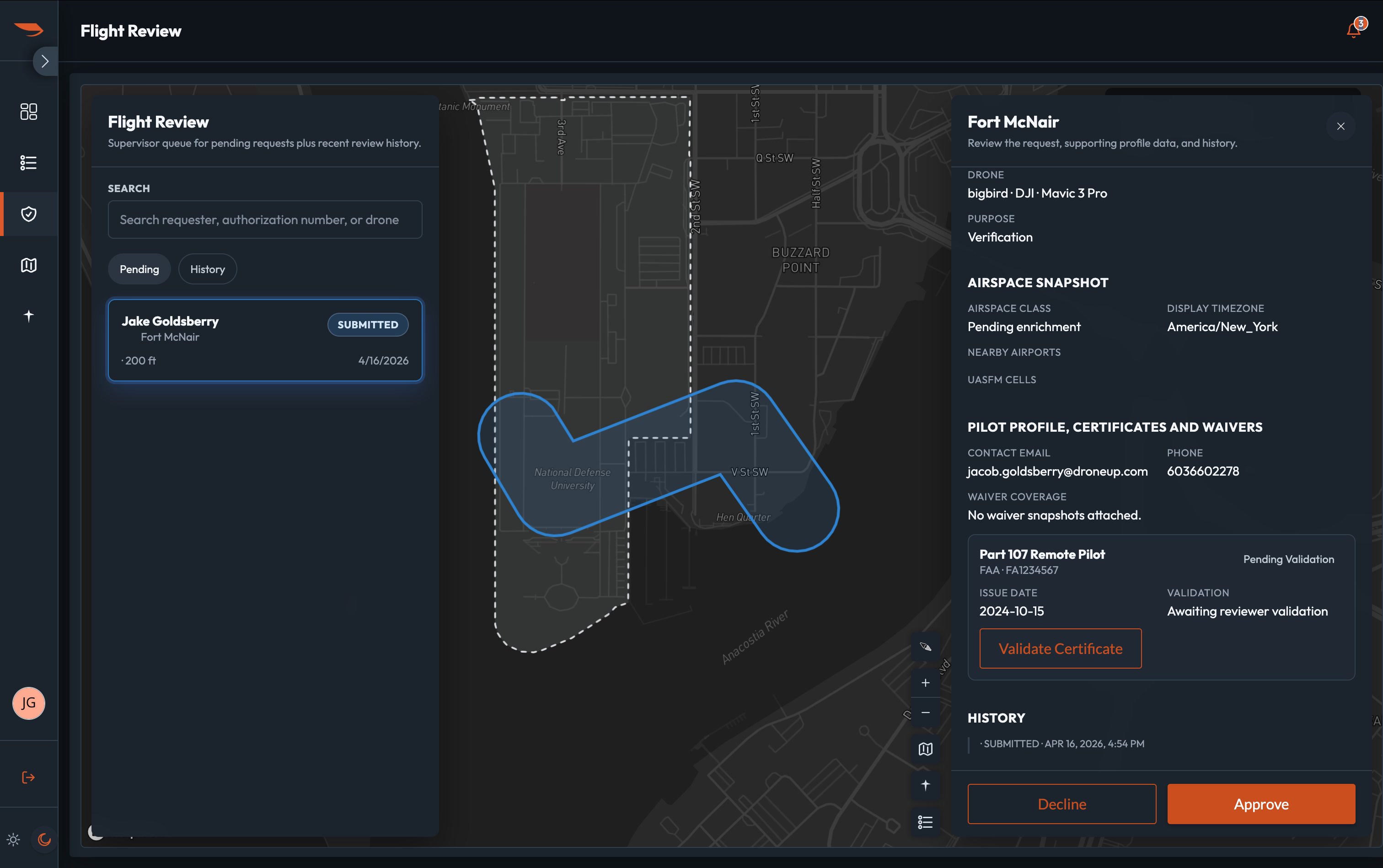
Talk track: “The authority can see the pilot’s credentials directly in the review panel. Validated certificates show here. If it’s pending, the authority knows before they approve.”*
“And if a flight plan touches airspace managed by more than one authority — a UAS route that crosses from the primary training area into the helicopter operations corridor — each responsible authority approves their segment independently. No phone calls between them. The system routes the request and collects the approvals.”
Scene 4: Non-Conformance Bridge (~1 min)
A known aircraft goes off-script
Switch back to live COP. Zones visible as overlays. Blue and green dots moving in the UAS training zone.
Talk track: “The range is running. Authorized flights in the UAS training zone, rotary wing corridor active above 500 feet, loitering munitions window coming up at 1400.”
“Watch this aircraft.”
Trigger non-conformance. Green dot drifts. Non-conformant indicator appears.
“This aircraft just left its authorized area. ATOMx caught it the moment conformance broke.”
Click the non-conformant dot. Show the detail panel.
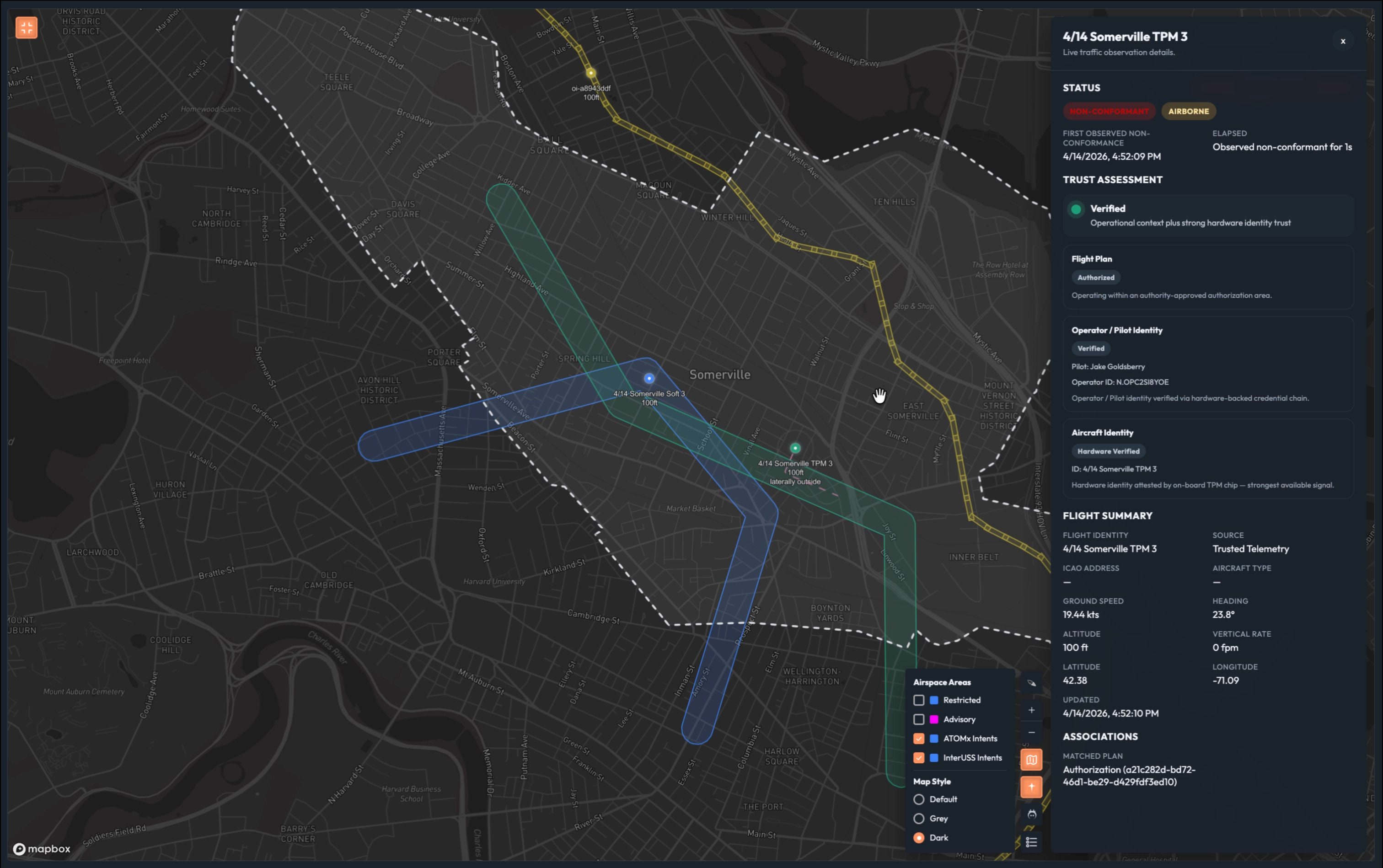
Talk track: “Everything we know about this aircraft is still right here. Hardware-verified identity. Authorized flight. Verified pilot. None of that changed. What changed is that it’s no longer where it said it would be.”*
“This isn’t an unknown intruder. This is a known aircraft behaving unexpectedly. Those are two completely different situations — and ATOMx tells you which one you’re dealing with, instantly.”
Pause.
“Why did it drift? We don’t know yet. Could be pilot error. Could be a technical fault.”
“What we do know: it’s moving toward the loitering munitions corridor. And that window opens in under two minutes.”
“Let’s talk about what happens next.”
Scene 5: Closing COP (~1 min)
Full picture
Switch back to observer view. Zoom out to show full Fort Campbell range. All three zones visible. Mix of blue and green dots in UAS training zone.
Talk track: “This is what we’re delivering.”*
Pause. Let the map speak.
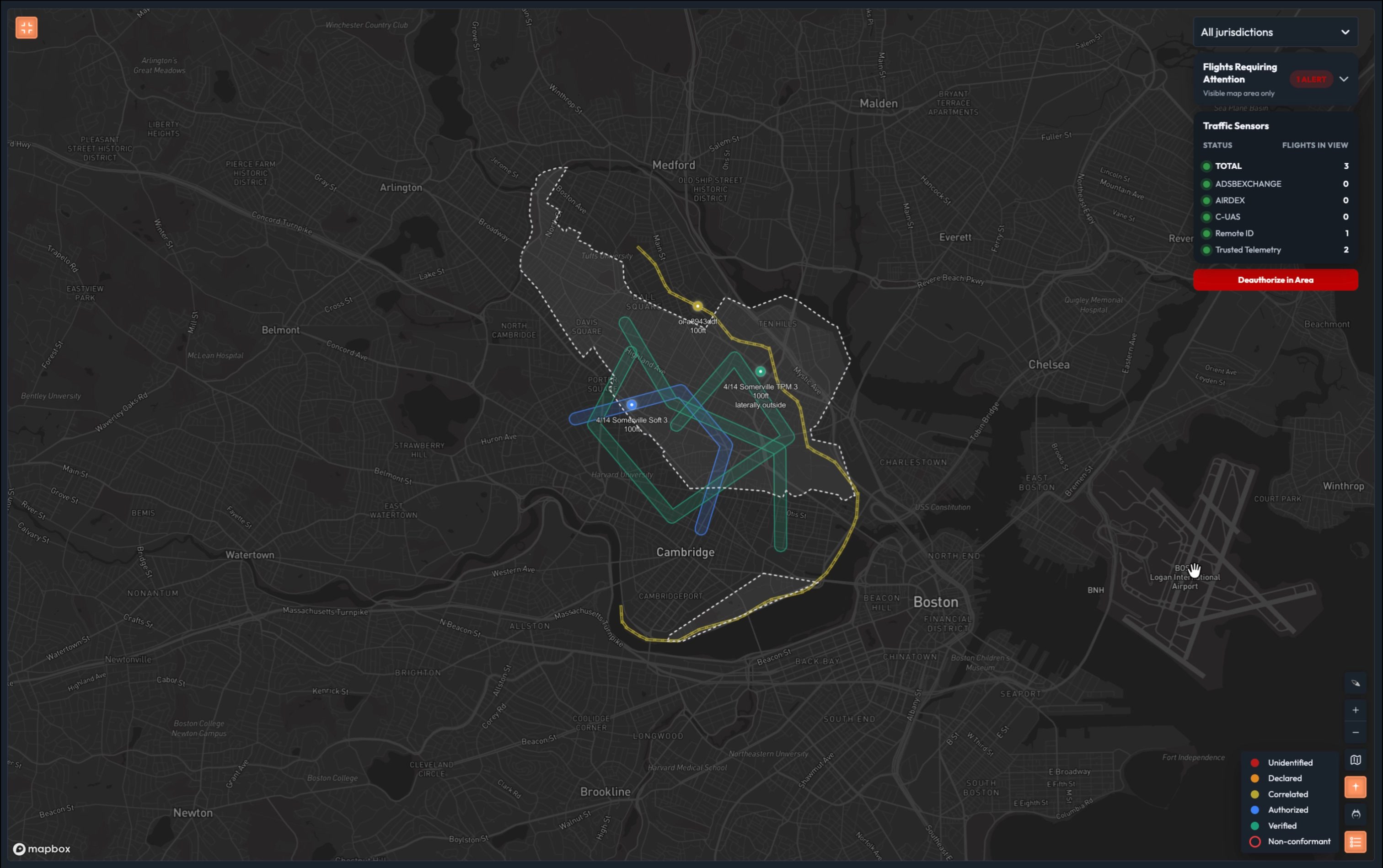
Talk track: “One screen. Every aircraft in your range, classified in real time. Every zone, every authority, every scheduled event — visible, enforced, and actionable.”*
Walk the legend:
“Red — unknown. Full stop until you know what it is.” “Orange — declared. Someone said who they are. You have no reason to believe them yet.” “Yellow — correlated. A plan was filed and matched. Context without authorization.” “Blue — authorized. Verified pilot, credentialed aircraft, every authority approved it.” “Green — verified. Hardware-bound identity. The gold standard. The aircraft that earns the smallest footprint and the most airspace.”
Pause.
“The difference between a range running mostly red and orange dots and one running mostly green isn’t just a safety story. It’s a throughput story. It’s how many units you can train simultaneously. It’s whether a GPS glitch grounds your whole operation or gets resolved in 30 seconds while everything else keeps moving. It’s whether you can run a loitering munitions exercise and a swarm operation on the same range on the same afternoon.”
“Today, that’s not possible. Not because the Army doesn’t have the aircraft. Because the infrastructure to manage that level of complexity doesn’t exist yet.”
Pause.
“This is that infrastructure.”
5. Demo Controls
All controls are accessible from the Demo Controls pull-out panel on the Live Map.
5.1 Controls Required
| Control | Scene | Effect |
|---|---|---|
| Fly | Scene 1 | Starts red dot moving on map |
| Fly Declared | Scene 2 | Adds Remote ID signal, transitions to orange |
| Insert Flight Intent | Scene 2 | Injects RFMSS-sourced intent, transitions to yellow |
| Fly Software-Verified Sim | Scene 2 | Launches blue dot (L4) |
| Fly TPM Sim | Scene 2 | Launches green dot (L5) |
| Deviate | Scene 4 | Makes green dot drift toward LM corridor |
| Populate Area | Scene 5 | Optional — fills map with mixed trust level traffic |
5.2 Design Constraints
- Panel slides out from left side of Live Map
- Labeled clearly as “Demo Controls”
- Legend always shows all five trust levels — not dynamic/viewport-dependent
- Non-conformance only applies at L3 and above
- Demo area is Fort Campbell, KY
- Swarm aircraft labeled AC-01 through AC-08
- RFMSS event ID: FC-2026-04-14-LM-007, window 1400–1500
6. Talk Track Tips
What to Emphasize
- Operational cost at each trust level: Every layer is about what you can and can’t do, not just what you know
- Speed: “Minutes to milliseconds”
- Determinism: “Same inputs, same output, every time”
- Range throughput: “How many sorties can you run today vs. with this system”
- The swarm future: “The radio call model doesn’t scale to what’s coming”
- RFMSS as the system of record: ATOMx doesn’t replace it — it makes it visible and actionable in real time
What to Avoid
- Don’t say ATOMx replaces RFMSS or any existing Army system
- Don’t claim specific separation reduction ratios without qualification — use the 2,000 ft FAA standard as the baseline and explain why it exists
- Don’t apologize for simulated data
- Don’t dwell on UTM architecture or FAA regulatory references — this audience operates in military special use airspace
- Don’t say the LM exercise “proceeds on schedule” — ATOMx doesn’t have that data; that’s the range safety officer’s call
Handling Questions
| Question | Suggested Response |
|---|---|
| “How do you verify the aircraft?” | “Software certificates and hardware TPM attestation. Happy to deep-dive after, but the key point is the outcome you see here.” |
| “What about our existing GCS?” | “ATOMx works alongside your existing ground control stations. The trust layer is additive — we’re not replacing how you fly, we’re making the identity and authorization of every flight machine-verifiable.” |
| “Does this integrate with RFMSS?” | “In the demo we’re showing RFMSS-sourced events appearing on the COP automatically. Full integration is part of the roadmap — we see RFMSS as the system of record for range scheduling; ATOMx makes that schedule operationally visible in real time.” |
| “What about swarm operations?” | “That’s exactly where this is going. The Army ran its first kinetic swarm exercise in January. Each aircraft in a swarm is individually authorized and tracked — one operator, full accountability, no radio calls.” |
| “Can this feed into Lattice/Maven?” | “Yes. We’re selling the data feed. The classification data is available via API for any downstream system.” |
| “What if an aircraft isn’t broadcasting anything?” | “Red dot. Unknown. That’s still your worst case — but with this system, everything around it is classified, so the red dots stand out immediately against a field of green.” |
| “What’s the formation flying / close proximity answer?” | “Formation flight is already a high-trust, pre-coordinated operation — which is exactly what L4/L5 formalizes at scale. Military MARSA is the same principle: when you have verified identity, shared operational picture, and real-time coordination, reduced separation is already accepted doctrine. ATOMx makes that the default condition for your entire range, not just your formation elements.” |
7. PRD Notes for Engineering
The following capabilities require product development to support this demo. See the companion PRD document for full requirements.
| Capability | Scene | Type |
|---|---|---|
| GPS glitch simulation (directional drift toward boundary) | Scene 4 | Enhancement to existing Deviate control |
8. Current State vs. ATOMx
| Capability | Current State (Manual) | ATOMx |
|---|---|---|
| Aircraft identity resolution | Radio call, manual lookup | Milliseconds — automated correlation |
| Trust level assessment | Human judgment, no framework | Deterministic, five defined levels |
| Range zone enforcement | Manual, radio-based | Automated geofence monitoring |
| RFMSS event visibility on COP | None | Real-time ingestion and display |
| Swarm accountability | Manual count, radio | Individual aircraft tracking, batch auth |
| Non-conformance detection | Visual observation or post-incident | Real-time, immediate alert |
| Incident response | Range shutdown, radio chase | Targeted airspace action, operator notification |
| Multi-authority coordination | Phone calls, emails | Automated approval routing |
9. Consolidated Talk Track
Read top to bottom. Everything in italics is spoken aloud. Actions are in plain text.
Scene 1 — Opening (~2 min)
“Fort Campbell runs the largest Army UAS training program in the country. On any given training day, you have Groups 1 through 3 UAS at low altitude, rotary wing up high, and occasionally loitering munitions exercises that have historically required shutting the entire range down.”
“Managing all of that today means a lot of coordination overhead — flight schedules, radio calls, manual deconfliction. Your range control officers are good at it. But every one of those coordination touchpoints is a place where things can go sideways, and when they do, your response is only as fast as your slowest radio call.”
“What we’re going to show you today is what it looks like when that coordination overhead drops to near zero. But to get there, we need to talk about trust.”
Click the red dot.
“This is your starting point. Let’s build the picture.”
Scene 2 — Trust Levels (~5 min)
Layer 1:
“This is your starting point. A counter-UAS sensor detected something. No identity. No intent. No authorization. Just a signal.”
“In range management terms, this is a full stop. One unidentified aircraft and your entire range tempo grinds to a halt. That’s the most expensive dot on this map.”
“ATOMx uses a range of data layers to establish trust. Let’s look at those now.”
Layer 2: Press Fly Declared.
“Now we have a Remote ID signal. Self-reported. No one checked.”
“This is actually where most range operations live today. Your flight schedules, your radio check-ins — declared systems. Someone told you they’d be there, and you took them at their word. That works until it doesn’t.”
Layer 3: Press Insert Flight Intent.
“Now we have a flight plan — filed through RFMSS or a flight planning service, matched automatically. Better. But filing a plan doesn’t make you trusted. It makes you expected. If something goes wrong here, you’re still chasing it down manually.”
Layer 4: Press Fly Software-Verified Sim.
“This flight came through the ATOMx authorization system. Verified pilot, credentialed aircraft, formally authorized. Machine-verifiable. No guessing. No phone calls. Same inputs, same answer, every time.”
“This is the threshold that matters. An authorized flight gets its corridor and stays in it. Your range tempo starts to recover here.”
Layer 5: Press Fly TPM Sim.
“Hardware-backed identity. Physically bound to the airframe. You can’t spoof it. You can’t clone it. The signal you’re seeing and the aircraft that was authorized are provably the same thing.”
“And here’s what that certainty buys you operationally…”
Show density comparison.
“The difference between a range running mostly red and orange dots and one running mostly green isn’t just safety. It’s sortie capacity. It’s how many pilots you can train in a day.”
“That’s the range we’re building toward.”
Scene 3 — Intent Authorization (~2 min)
Switch to range authority view. Open Flight Review.
“Everything we just saw on the map — the blue dot, the green dot — those came from somewhere. This is where the range authority works.”
Approve a flight.
“The pilot is notified immediately. The system records the authorization. From this point forward, that aircraft is blue on the map.”
“If a flight plan touches airspace managed by more than one authority, each approves their segment independently. No phone calls.”
Scene 4 — Non-Conformance Bridge (~1 min)
Back to live COP.
“The range is running. Watch this aircraft.”
Trigger deviation.
“This aircraft just left its authorized area. ATOMx caught it immediately.”
“This isn’t an unknown intruder. This is a known aircraft behaving unexpectedly. Two completely different situations — ATOMx tells you which one, instantly.”
“Why did it drift? We don’t know yet. What we do know: it’s moving toward the loitering munitions corridor. And that window opens in under two minutes. Let’s talk about what happens next.”
Scene 5 — Closing (~1 min)
Zoom out. Full range visible.
“This is what we’re delivering.”
Walk legend quickly.
“The difference between a range running mostly red and orange and one running mostly green isn’t just safety. It’s throughput. Sorties. Whether a GPS glitch grounds your operation or gets resolved in 30 seconds. Whether you can run a loitering munitions exercise and a swarm on the same range the same afternoon.”
“Today, that’s not possible. Not because the Army doesn’t have the aircraft. Because the infrastructure to manage that level of complexity doesn’t exist yet.”
Pause.
“This is that infrastructure.”